Businessman analyzing company's financial balance sheet working with digital augmented reality graphics. Businessman calculates financial data for long-term investment.

Inside 5 Horizons: A/B Testing on LinkedIn

Danielle Romano, Director of Performance and Analytics, shares her thoughts on the necessity of LinkedIn A/B testing.


A/B testing is an essential experiment for determining which form of content performs better on a platform and drives higher engagement and results. Here is what Danielle’s team has discovered through experimenting with LinkedIn A/B testing.

What can you A/B test on LinkedIn?

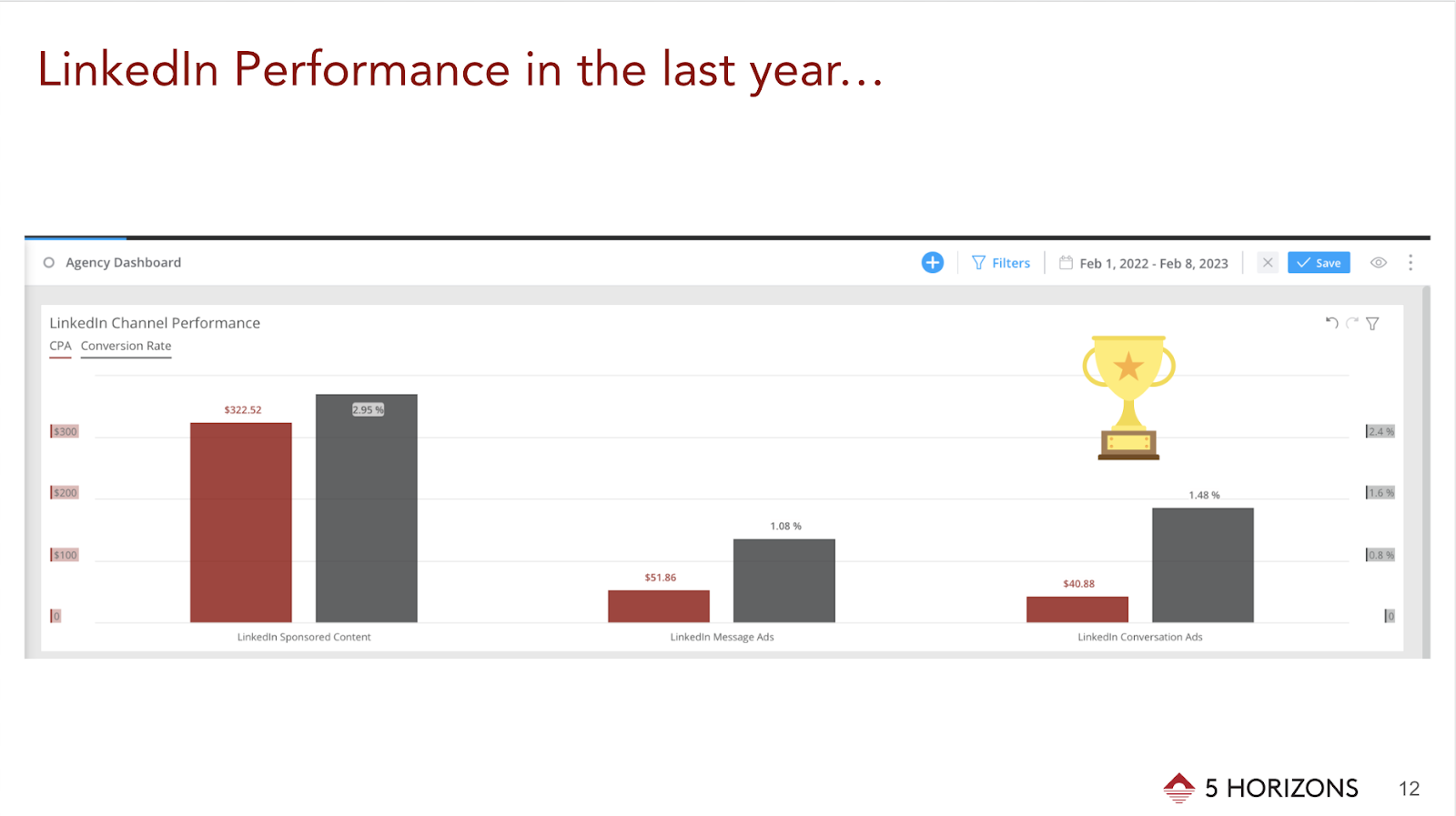
Through A/B testing, we learned that LinkedIn Conversation Ads performed best for our higher education clients and generated the most leads. We hypothesize that we saw such a significant increase in results because the Conversation Ad format provides just the right amount of context for people to act and request more information. 

Things to keep in mind when considering A/B testing for this platform:

Copy Length

Short and long copy speaks to how much information and details someone needs to take action, and experimenting with different text lengths can help establish best practices for the future.

Ad Formats 

LinkedIn offers a variety of ad formats to choose from, all of which can be put to A/B testing to find out which format is the most successful for specific objectives.

Text Ads

Text ads are a great format to use when the message is clear and concise—brand campaigns typically benefit from this LinkedIn ad type. When it comes to our practice, we don’t usually reach for this format because we run program-specific campaigns for our higher education clients. Through A/B testing, we learned that such campaigns perform better when additional copy and visuals are present.

Sponsored Content

This format works well for event ads or advertising programs at a brand level. We typically run in-app lead generation campaigns using this format with a program brochure or a “request more information” call to action as our incentives.

Conversation Ads

Conversation Ads tend to succeed when used for a program that may be unique or requires additional context. This strategy also works well for smaller clients because it goes directly to the users’ inboxes without having to fight for space in the feed.

Document Ads

Document Ads are new to Linkedin, but we anticipate this format to become a new way of advertising program brochures or any relevant learning materials that can be easily formatted as a .pdf file.

Images 

  • Images of people vs. images of objects: Sometimes a photo of a person in business attire works well for a client, other times a textbook with a client logo outperforms elsewhere. 
  • Branded imagery vs. non-branded imagery: Well-known brands typically generate better engagement rates when there is a logo associated with the image, whereas local or smaller brands can blend in with the feed through a more organic image, without any branding. 

These tips and resources can be used to start and better understand the importance of A/B testing for any brand or client. If you’re curious to learn more about LinkedIn, read our 2023 LinkedIn Updates and stay up-to-date on how to use the platform to its fullest potential.

The Inside 5 Horizons series includes stories and perspectives from our amazing team. Get a glimpse into our company culture each month by hearing the unique voices of our copywriters, strategists, project managers, and more.

An overhead view of a man typing on his laptop, a gold watch on his left wrist. A notebook and pen open to his left with blank pages.

Best Practices for Creating Effective Content Posts

Optimizing your web pages for specific keywords can increase page ranking and boost traffic, but it may not be enough to achieve your goals. Strategically written content pieces can help improve keyword visibility through internal links to the page.

At 5 Horizons, we recommend a hub-and-spoke model where content includes links to other pages on the site. This strategy should also include planning for links between content pieces to provide authority and keep visitors on the site for as long as possible.

Start with a Content Strategy

A good content strategy will follow a site audit for keyword ranking and visibility. Questions to ask in a formal or informal audit include:

  • What keywords is the site already ranking for?
  • What is the search volume for those keywords?
  • What is the search volume for related keywords?
  • What topics and questions show up for “people also search”?
  • What are the most important pages on the site for organic traffic to find?
  • Where is the most potential for increasing page ranking?

These answers will help you identify target keywords, create a list of topics that can attract searches for those keywords, and map out page links. 

Create a Strong Foundation

While the actual content is quite important, there are several considerations that will make a big difference for the search engines.

Write Meta Titles That Matter

Meta titles should be limited to approximately 65 characters. This may require abbreviating the company or organization name, which is often acceptable since incorporating the keyword phrase into the supporting content is more important.

Create Compelling Meta Descriptions 

The meta description is most often used as the text that appears on the search engine results page. These should be approximately 145-155 characters and contain at least one instance of the keyword or keyword phrase. Be sure to include compelling content that encourages users to click the link. If your page is missing a meta description, the search engine may grab text from the webpage that isn’t relevant, resulting in fewer clicks to your site.

Remember to Write for the Bots and for the Humans

Search engines may determine how to rank web pages, but it’s ultimately the human readers who will or won’t engage. Therefore, the content needs to be keyword-rich without simply being keyword-stuffed. It needs to be interesting, well-written, and easy to scan. Use headlines (h2s and h3s) to guide readers (and the bots) through the piece. Bulleted or numbered lists also aid in content consumption.

Say What Needs to Be Said

You will find plenty of recommendations about how long a content piece should be for maximizing ranking. The most important consideration in writing content is saying what needs to be said in the number of words it takes to do so. Too short and your reader won’t find what they’re looking for; too long and they won’t bother sticking around to find out.

General Recommendations and When to Split Up

Each content piece should be approximately 500 to 750 words and include at least three to five mentions of the relevant keyword(s). The emphasis should be on providing interesting content that appropriately addresses the keyword topic. If this greatly exceeds the recommended length, consider breaking into multiple pieces of content and linking between them. 

H1s Get to Be Unique

Include the keyword in the main on-page title (h1). There should be only one h1 per page, and it should be unique within your site.

Provide Guideposts

Subheadings (h2) provide other opportunities for including the keyword or other variations and also guide readers through the content, whether they are skimming or searching for relevant information. We have provided multiple keywords for each content idea, and these should be included as h2s and/or within the content when it is easy to do so while maintaining readability. Preference should be given to keywords with higher search volume.

Include Variety and Avoid Cannibalization

Frequently, the difference between identified keywords and search volume is a matter of semantics and the monthly search volume may vary widely between phrases that appear quite similar. This is why we recommend including varied iterations within the content.

At the same time, it’s important to avoid cannibalizing rankings of other pages on the site by creating content pieces that overlap too closely or use too-similar keywords. If there isn’t enough differentiated content for a stand-alone post, consider using the related keywords as h2s within the larger piece.

Use Links to Drive Traffic

Use internal links on the keyword or keyword phrase to direct to the relevant website page. Links can also connect pieces of content to drive authority for those individual posts and for the site as a whole. Each content piece should have two or three links to other pages on the website.

Encourage Engagement with Strong Calls to Action (CTAs)

Each piece should end with a clear, prominent call to action (CTA) that ties back to the purpose of your site. This could be learn more, apply now, or another relevant action. 

Get In Touch

Questions about your recent audit? Coming up blank on content ideas? Ready to review your site? Reach out. We’re happy to help.

June 8, 2019 Mountain View / CA / USA - Google office building in the Company's campus in Silicon Valley; The "double o's" of the logo are decorated in rainbow colors in honor of LGBTQ Rights

What Does it Mean to be a Google Premier Partner for 2023?

This St. Patrick’s Day it’s not luck, it’s hard work.


5 Horizons has been named a Google Premier Partner for 2023. Many of our clients come to us for Google Ads assistance. Becoming a Google Premier Partner takes a lot of time and hard work. 


“We’re excited to recognize your company as a 2023 Premier Partner and for being in the top 3% of partners in your country. Achieving Premier Partner status is an accomplishment worth celebrating, and distinguishes your company as a Google Ads expert to clients and the industry.” – Google


As a Google Premier Partner, 5 Horizons has achieved and exceeded all requirements, while demonstrating continuous success with:

  1. Certifications
  2. Ad spend
  3. Performance

Our team is constantly looking to improve our skills with Google Ads and this recognition is proof of it.

How Does That Help Our Clients?

As a Google Premier Partner, we receive a variety of benefits from Google, allowing us to provide additional services for our clients.

Benefits include:

  • Dedicated Account Management
  • Google Partner Search Listing
  • Client Event Support
  • Networking with Other Agencies
  • Executive Business Trainings for Our Employees
  • Dedicated Support Representatives & Teams
  • Annual Partners Summit & Review
  • Google Partners Badge 

Ready to Work With Us?

As Google Premier Partners, we know how to achieve success with Google Ads. Reach out to us today if you’re looking to improve your advertising strategy. 


7 LinkedIn Updates Coming in 2023

7 LinkedIn Updates Coming in 2023

New LinkedIn features for advertising, content analytics, and accessibility.


LinkedIn recently announced seven new features coming in 2023, most of them focusing on improving the platform’s accessibility and optimizing content creation. Here’s what marketers and users can expect LinkedIn to add by the end of the year:

1. Increased Video Accessibility

To keep up with the increased demand for video content, LinkedIn will automatically generate English captions for videos uploaded to the platform and will give users the option to add or edit captions before publishing their videos. To further enhance the accessibility of videos for those with visual impairments or low vision, the user will be able to activate high contrast mode with the LinkedIn app.

2. Standardized Accessibility Job Titles

People working in the field of accessibility can now select from a list of standardized job titles, such as “accessibility designer” or “accessibility engineer.” This feature will increase user’s exposure and access to job opportunities that better match skills in accessibility.

3. Alt Text Functionality in Campaign Manager 

Advertisers can now add alternative text (alt text) descriptions to images in their ads to help visually impaired or blind users understand what images are portraying.

4. Updates To Job Search 

The platform is currently testing personalized job collections that users can discover without conducting a search. This update is the result of LinkedIn reporting a recent increase in people looking for job opportunities more casually. Whether it’s to find a position that better fits their values and interests or to switch to a role that offers a better work-life balance and professional advancement, LinkedIn wants to better assist casual job-seekers.

5. Product Pages for B2B Product Search

LinkedIn launched Product Pages to empower professionals to make better, more informed purchasing decisions. While LinkedIn is still working on improving the relevance of Product Pages to create a more personalized experience, businesses can already search the platform for 90,000 B2B products.

6. Post Scheduling

Brands and businesses will benefit from LinkedIn’s new feature of scheduling posts in advance to be published at a later date. This update will eliminate the need for third-party social media management platforms, allowing users to streamline the post process on LinkedIn.

7. Content Analytics

LinkedIn is updating the creator analytics dashboard to include audience data and top-performing content. This lets businesses examine the effectiveness of their content, gauge the evolution of their following, and discover more about the audience’s demographics. In order to access these analytics updates, the user must activate the creator mode.


In need of LinkedIn advertising? Our years of experience on this platform allow us to use the new features to our advantage and help our clients achieve their marketing goals. Contact us today and let us help you take your LinkedIn engagement beyond the horizon.


Group of young creative people in a pleasant atmosphere in the office is clapping to a lecture held by their boss

Make Your Google Slides Presentation Pop

Tips for crushing your next visual presentation.


A key element of a captivating slide show is its aesthetics. Making your visual presentation stand out can help retain your audience’s attention and share your information in a digestible and easy-to-follow manner. Here are six tips you can implement in your next presentation:

1. Use presentation templates to save time and keep your design streamlined

Google Slides comes with 20+ default templates to choose from, which can help you save time and energy on design. Of course, if you want your presentation to be tailored to your business, consider spending some time designing a new template that follows the guidelines of your brand or building off of an existing one. Once you design the template, it can be reused for future presentations, keeping your style streamlined and coherent.

2. Stick to brand colors and fonts for professional representation

Whether you are using your brand’s custom template or not, a clean aesthetic can be achieved by following your brand guidelines when it comes to colors and fonts used in your presentation. A consistent slide style can help the content shine, without too many colors and fonts distracting from the main information you are looking to convey.

3. Match fonts to your topic of discussion 

Just like the subject matter, fonts have their own personalities. The key to making a good impression with your font is to make sure it matches the topic of your discussion, so keep that in mind when debating between using a serious or a more playful font.

Extra tip: Don’t mix more than three fonts in one presentation. Just like when it comes to colors, you should prioritize consistency and brand style to keep your slides looking straightforward and not too busy.

4. Use transitions in moderation

Transitions are a great tool for visualizing moving from one thought to another within a presentation. Just like the majority of Google Slides features, transitions are best used in moderation. Save them for when you are switching topics or include one at the end, when you are offering an opportunity for your audience to ask questions or share feedback.

5. Utilize infographics to make data more digestible

Nothing makes eyes glaze over faster than long blocks of text on every slide. Infographics and charts are great visual tools you can use to highlight the necessary information and data in a streamlined and digestible manner. Making heavy material accessible to your audience is an important factor in a successful slide presentation.

6. Don’t be afraid to get creative: videos, gifs, memes, and 3D images are all eye-catching

All of these visual forms of media can help your audience relate to and connect with your presentation better, further capturing their attention. Of course, as with everything else, moderation is key, but embedding videos and other creative content can make your presentation stand out. And there is nothing quite like a context-fitting gif to liven up your slides.


As insightful as your content might be, the way you present it can make or break a presentation. Incorporating the tips above into your Google Slides will ensure your audience remains engaged and involved in the information you are sharing and helps you make a lasting impression.

Clock’s Ticking

Clock’s Ticking

4 Ways to Use TikTok for Higher Ed Marketing


What originally started off as three different apps is now one of the fastest-growing influential social media platforms. With a wide selection of sounds, special effects, and filters, TikTok has paved the way for users to easily create content like never before. 

TikTok is just over two years old, but doesn’t seem to be slowing down anytime soon. Though you may be late to the TikTok game, your educational institution can leverage the platform’s success to achieve marketing goals by identifying your audience, tracking trends, finding the organic approach that works best for you, and boosting your videos with a small budget.

 1. Identify Your Audience

Although TikTok is predominantly populated with Gen Z, your content should be targeted at a unique audience beyond age. For instance, an older audience is most likely to have financial decision-making power and is susceptible to messaging about getting ahead or changing careers. Utilize TikTok to narrow your prospects to those who may be entering college soon, finishing a degree, specializing with a certificate program, or pursuing a master’s or doctoral degree.

2. Track the Trends

Building your TikTok presence involves more than just producing content. If your school is new to TikTok, start by paying attention to trends that align with your institution’s mission. Some of the trends can be leveraged in messaging on other platforms, but keeping up with what’s in and what’s out is essential. Before you start actively using TikTok, be sure to clearly identify the goals behind your engagement.

3. Take an Organic Approach

One of the common goals of social media marketing is to build brand awareness. An organic TikTok presence is an effective way to accomplish this. Start with people who represent your institution best: mascot, orientation leaders, tour guides, and student ambassadors. They can provide intriguing snippets of student activities, orientation sessions, and other aspects of campus life. Monitor your account for brand consistency and involve students as much as possible to significantly expand your college or university’s reach.

4. Pay to Play

Paid advertising on TikTok is a great way to insert your institution into the stream. The goal of advertising on social media should be impressions and views (not clicks) as they’re exactly what will help increase your brand awareness. Boosted brand awareness can in turn amplify performance on other channels, such as Instagram, Facebook, or even your website, where audiences are more likely to click or inquire. The clock is ticking, but there’s still time to take advantage of all that TikTok has to offer. Combining organic and paid efforts can help your institution achieve the primary goal of growing your audience and driving brand awareness. If your school needs assistance with advertising on TikTok or creating engaging content for the platform, contact 5 Horizons to discuss how we can help you grow.