hands printing code on laptop. internet technology concept business front-end developing banner. mixed media background

How to Create a Successful Landing Page

Landing pages can be useful for a variety of reasons in any industry. Maybe your business is looking to generate leads or improve conversion rates––a landing page can focus your efforts on a single call to action and avoid distractions. Or maybe you’re promoting an event or new business location––a landing page can assist you in targeting the right audience and improve your local search traffic.

Whatever your goal may be, here are our top tips for creating a successful landing page:

  1. Approach your landing page with a goal and audience in mind––what is your main message and what action do you want visitors to take?
  2. Make your call to action very clear––what do you want a site visitor to do when they arrive at your landing page?
  3. Prioritize your headlines for skimmable reading––put the most valuable information in your headlines and at the top of the page.
  4. Focus on a clear design and brand voice––even if your landing page is not linked to the main site or accessible through the main navigation, you want your brand to be recognizable and inline with your main site.
  5. Make sure your landing page is mobile friendly––a large majority of users engage with advertising and websites via mobile device, so a clean mobile experience is paramount for success.
  6. Utilize SEO language and meta data to boost your visibility––landing pages rely heavily on Search Engine Optimization (SEO) to target the correct audiences.
  7. Plan your promotional campaign to drive traffic––when you’re ready to launch your landing page, having a strong promotional campaign in place is key to reaching your target audience and achieving your goal.

If you’re looking to create a high-ranking landing page, let’s talk! Our team can assist you in strategy, design, and implementation, guaranteed to get you the results your business needs.

Social media and digital online concept, woman using smartphone and show technology icon.

Advertising on LinkedIn in 2024

LinkedIn is one of the most efficient social media channels for advertising placements when it comes to reaching professional audiences. Whether you’re targeting prospective clients, students, or team members, LinkedIn offers a variety of ad types, helping you achieve specific goals and conversions. But with so many ad types to choose from, how do you know which one is the best for your objectives? 

At 5 Horizons, we are no strangers to LinkedIn ads and can guide you through the different routes you can take when advertising on this social platform.

Types of LinkedIn Ads

Sponsored Content

Probably the most recognizable ad type, sponsored or “native” content ads appear on the users’ feeds just like any regular content would—except the ads are labeled as “promoted.” Within this umbrella, there are six subcategories:

  1. Single image ads—the most classic and well-recognized ad format that features a single static image.
  2. Carousel ads—multiple static images displayed in succession that provide additional space for content to be swiped through and interacted with.
  3. Video ads—a format that features video content and gives you additional insights such as how far into watching your video users got.
  4. Event ads—a format that promotes your event from your LinkedIn page and is optimized for maximizing attendance.
  5. Document ads—a format that allows LinkedIn members to read and download documents directly from their newsfeeds.
  6. Thought leader ads—a format created to boost the already existing content and highlight the team members’ voices.

Sponsored Content ads are most frequently used to raise brand awareness, build relationships, and drive quality leads. Six different format options allow you to highlight the media that aligns with your company, organization, or school the most.

Sponsored Messaging

Sponsored Messaging ads let you begin conversations directly with your prospective leads. By reaching the LinkedIn members’ inboxes, you’re more likely to establish a personal connection with them. This ad type can appear as if sent by a specific member of your team, ultimately increasing the chances of your content being seen and engaged with. This customizable ad format allows you to include a lead generation form in your message, making it an even more effective route for organizations interested in gathering relevant information about their audiences. 

There are two kinds of sponsored messaging on LinkedIn: 

  1. Message Ads—format that consists of your targeted message and a single call-to-action button.
  2. Conversation Ads—format that gives you more opportunities to interact with your audience through multiple call-to-action buttons. Those can lead to your landing page, open a lead gen form, or serve as a prompt to continue the conversation.

Text and Dynamic Ads

Text and dynamic ads are other personalized formats that speak directly to your audience. Except this time, instead of appearing as a new message in their inbox, they pop up in a member’s feed, specifically on the LinkedIn right rail. 

Text ads are only compatible with desktops and consist of a small image, a short headline, and a description. Dynamic ads look very similar, except they are tailored to members based on their LinkedIn profile data and also feature a call-to-action button. Dynamic ads can be implemented in three different formats:

  1. Spotlight Ads—used to highlight a specific product, service, or event.
  2. Follower Ads—aim to increase your page’s follower count.
  3. Job Ads—hold the objective of driving quality candidates to your open positions.

All these formats act as “bite-sized” advertising avenues. With minimal copy and visuals, they’re intended to grab a person’s attention and entice them into learning more about your offerings.

Bottom Line

The variety of advertising opportunities on LinkedIn can be overwhelming, but a well-developed strategy can help narrow down the right ad format for you and your goals. As experts in social media advertising, 5 Horizons works with clients from various industries, using LinkedIn to tailor ads to their unique audiences. Contact us to learn more about how advertising on LinkedIn can help meet your objectives.

Technology background of the abstract computer motherboard, can be used in the description of technological processes, science, education. Can be used as digital dynamic wallpaper. 3d rendering

Unlocking SEO Potential at MozCon

A Look Back at MozCon 2023 as We Prepare for the 2024 Conference


In August 2023, our technology team attended MozCon 2023 in Seattle and spent two full days learning, talking, and exploring innovative ways to implement Search Engine Optimization (SEO) and all of the facets that surround best SEO practices.

Our team arrived back on the east coast ready to share all of their ideas with the full company and begin implementing everything they learned. After spending some time putting their new education into practice, they have highlighted the greatest takeaways from last year’s conference.

Here are the top three topics that our team highlighted as most important after MozCon 2023:

1. Google is a Digital Ecosystem

Google is only one search engine among many, but it stands out from all the rest because of its broad expanse of offerings. Google is now a social network, a business directory, a place to shop, a place to image search, an aggregator, and a personal assistant––all rolled into one.

Thinking of Google as a digital ecosystem encouraged our team to incorporate all Google had to offer into our strategy and web presence going forward. SEO is equally interconnected and needs to be woven into all layers of content, campaigns, websites, and ads from start to finish. Google is currently the expert on users’ motivations for search and data collection, making Google the key to connecting with targeted audiences.

How our team is using Google differently in 2024:

  • Not thinking of Google solely as a search engine
  • Not getting sucked into the algorithm-thinking SEO practices
  • Using Google’s offerings to find and retain target audiences
  • Exploring content beyond just web pages––especially indexed YouTube video
  • Focusing on identifying local link opportunities in addition to traditional backlinks

2. GA4 Offers Privacy Conscious User Data

Google Analytics 4 (GA4) is a customizable tool our technology team uses to measure traffic and engagement across the websites that we create, optimize, monitor traffic, and study user behavior. In order to address privacy concerns, Google moved away from Universal Analytics (UA) and implemented the GA4 data structure to collect, store, and use data in a way that is compliant with privacy regulations in different countries/states while focusing on events rather than sessions. It uses modeling to estimate conversion data that can’t be observed directly without identifying users. GA4 aims to collect user web and app data  in a privacy conscious manner while preparing for a cookieless browsing future.

How our team is leveraging GA4 in 2024:

  • We are using GA4 to track user behavior and sources of traffic
  • We are using the funnel report builder to analyze flows and track conversions
  • We are customizing our team’s navigation for easy access to useful reports
  • We are building custom audiences and using them for remarketing in Google Ads
  • We are using GA4 to measure the impact of our paid media efforts 
  • We are using GA4 to create custom reports to extract key insights for decision making 

3. AI and the Rise of Large Language Models

Artificial Intelligence (AI) is not new, but universal accessibility to it is. Like many, our team regards AI with equal parts skepticism and curiosity. While at MozCon our team approached new information about AI with an open mind and challenged their own beliefs to embrace experimentation.

ChatGPT is a natural language processing tool developed by OpenAI to generate human-like text based on input. OpenAI trained ChapGPT on a massive amount of text data from the internet, using a machine learning model known as a large language model (LLM). ChapGPT “learns” by identifying patterns in the data and uses them to make predictions.

After Open AI launched ChatGPT, many companies such as Microsoft and Google started to integrate ChatGPT into their search engines or created their own LLMs, such as LaMDA/Bard and Bing Chat.

How our team is leveraging AI in 2024:

  • Increasing efficiency as a digital partner and personal assistant
  • Solving problems and expanding research
  • Learning better skills for prompting AI
  • Integrating ChatGPT functionality into other applications
  • Increasing transparency when using AI and sharing it’s benefits with each other
  • Continuing to explore all that AI has to offer our company workflow

Our technology team was thrilled to learn all they could from MozCon in 2023 and are very excited to gain even more exposure to new technologies at MozCon in 2024.

Education is at the heart of everything we do. If you are looking for a partner who is constantly exploring and learning new technology, we are ready to share our knowledge with you and solve your digital marketing problems. Let’s connect!


Computer Keys Keyboard Scattered on White Background

How to Write Effective Alt Text

Alternative text (alt text) is an important part of website optimization. But how do you write it effectively, for the people with visual impairments and for the search engines? Follow this step-by-step guide to writing good alt text.

Examine your image closely 

What is happening in the image? What information is it conveying? What would a viewer be missing if they couldn’t see this image? 

Mention the specific image medium

Your viewer’s screen reading program will tell them that it is an image, but not what kind. Is it a photo, an illustration, or an infographic? This detail will help your audience understand your content much better and take action if it calls for one. When writing alternative text, be as specific as possible, instead of simply stating “image of…”

Include all important elements 

Consider everything, even what is being implied. Is the image conveying a mood, activity, etc. not mentioned elsewhere? 

If the image has text, write it out

Graphics, posters, and other designed image content frequently feature copy. Make sure to write it out when working on your alt text.

Consider the image’s layout

If the layout is essential, include details about it in your alt text.

Consider uX while writing alt text

Keeping user experience in mind will help you determine which elements add to the website experience and which don’t. For instance, decorative images that serve no function beyond aesthetics do not require alternative text. 

By following these steps, you can ensure that your visual content is accessible to everyone and helps your site rank higher in search results. Learn more about Alt Text Best Practices.

Need help reaching your digital advertising goals? Connect with us to learn more

online marketing term on white background wooden abc alt text

Alt Text Best Practices

What is alternative text (alt text) and how to use it effectively? 


Although a picture is worth a thousand words, it may be worth nothing to someone unable to see it. Without the proper parameters in place, disabled or visually impaired people may not be able to access the content from images inserted in webpages or posted on social media. This leads people to miss out on vital information about you, your company, and content. A solution to this issue? Alternative text. 

What is Alternative Text? 

Alternative text (or alt text) is a form of descriptive text used to detail the appearance and function of an image. This text is then read aloud to visually impaired or disabled users. It also can be utilized in place of an image if it fails to load, as well as indexed by search engines to understand the contents of your page, making your images appear higher in related searches. 

The Benefits of Using Alternative Text 

Accessibility

The biggest benefit of using alt text is the accessibility aspect. The inclusion of an image on a webpage, an article, or wherever it may be, denotes some level of importance or relevance to the information being conveyed. In the case of infographics, charts, and images with texts, such information could be vital to a person’s understanding of content, and if they’re unable to see it, they won’t process the information and/or take action as needed. By implementing the use of alternative text, any viewer, regardless of disability, could access all of your material, helping them access your content in its entirety. 

Search Engine Optimization Ranking

Alternative text is also beneficial for SEO purposes. Having alt text on your photos allows search engines to determine what your photos portray, which can lead to enhanced ranking, and images/content appearing higher in search results.

Alternative Text Examples: Good and Bad 

Some people fall into the trap of using alternative text for “keyword stuffing,” or trying to bring their image higher up in search results by applying as many words as they think will appear in a related search. This approach does not take into account the purpose of alt text for the visually impaired and therefore does not fit the accessibility standard. 


An example of keyword stuffing is alt text that looks like this: 

“Young child smiling at the camera, sitting in a snowy frozen plane of snow and ice during winter or Christmas with their arm around a husky dog. Mountains, skiing, snowboarding, sledding, hat and gloves, snowball fight, blue ski jacket, yellow or green snow pants.”

Good alt text is quick, to the point, and describes the image at hand. For example: 

“A young child wearing winter gear sits in the snow and smiles at the camera with their arm around a husky dog.”

Alternative text is an integral part of making your content accessible, as well as a helpful way to make your content appear more relevant in search results. Read this blog for a step-by-step guide to writing good alt text, and take advantage of this tool to help your content reach a broader audience.

Learn more about How to Write Effective Alt Text. Need help reaching your digital advertising goals? Connect with us to learn more

Magnifying Glass on white computer keyboard on white desktop with accessories.

Google’s Changes to FAQ and HowTo Results: What Website Owners Need to Know

As of September 2023, Google reduced the visibility of FAQ and HowTo information in its search results. If you haven’t seen the impact of this decision on your website’s traffic yet, here is everything digital marketers and website owners should know if considering rethinking their strategy.

FAQ Results

Google now limits the regular display of FAQ-rich results to well-known and authoritative websites, primarily in the government and health sectors. Google’s algorithm will determine which websites fall into these categories.

HowTo Results

Attempting to simplify search results, Google no longer shows HowTo rich results on desktop or mobile devices. For this reason, this search result type has significantly lost its value.

What Changes Do You Need to Make

If your site features structured data, you don’t have to proactively remove it. Though it has no visible effects in Google Search, it’s not going to cause any problems either. FAQ and HowTo Schema markup may also continue to be useful for other search engines, aiding in content indexing and rich result display in SERPs.

Impact on Website Traffic

Google doesn’t consider this global update a ranking change, so the effects of FAQ’s and HowTo’s reduced visibility remain to be fully felt. Most likely, the removal of these sections from SERPs will lead to more search results displayed on a single screen, increasing the competition for clicks. Website owners who currently employ FAQ and HowTo Schema markup should prepare for potential traffic fluctuations, which may vary based on context and the type of website you have. 

Staying up-to-date on Google’s updates and closely monitoring your website’s performance can help you effectively adapt to the evolving search result dynamics. And with 5 Horizons, you can always stay on top of digital marketing industry trends.

A/B TEST Laptop on table man work test

What is A/B Testing and How to Use It?

A beginner guide to A/B testing and achieving quick results.

What is A/B testing?

A/B testing, sometimes referred to as “split testing,” is a user experience research method that compares two versions of something to learn which performs better. When it comes to ever-evolving digital advertising, A/B testing is extremely important, as it helps us learn new strategies to improve our campaigns.

Benefits of A/B testing?

A/B testing can help you implement long-term strategies and solutions for your brand or your clients. A/B testing is highly customizable to fit everyone’s individual needs and goals, but here are some common benefits of A/B testing:

  1. Make data-backed decisions

A/B testing takes the guesswork out of your advertising and marketing campaigns, enabling you to make informed choices when it comes to optimizing your content.

  1. Reduce bounce rates

With A/B testing, you can try out different tactics of retaining your leads and audience on your website longer, increasing the likelihood of them interacting with your content.

  1. Quick results

In a fast-paced world of digital marketing, quick and reliable results are crucial for increasing campaign effectiveness. Even a relatively small A/B test can provide significant, actionable results that allow for low-risk modifications and improved campaign performance.

How do you start A/B testing? 

  1. Carve out a portion of the budget to test with (percentage allocation will depend on the overall client budget). The remaining budget should be prioritized for the highest-performing campaign.
  2. The A/B test campaigns should always run at the same time. The only variable that should be different is what’s being tested—everything else, such as flight, budget, and audience should be the same.
  3. The testing period should be set for about 2-3 weeks, no matter which of the two tests (or both) you decide to move forward with.
  4. The key performance indicator (KPI) of A/B testing for lead generation campaigns should be Leads/Cost-Per-Lead (CPL), and the KPI for brand or traffic campaigns should be website traffic or clicks.

Want to learn more about A/B testing for specific social media platforms? Read our blog on the importance of LinkedIn A/B testing or contact us to learn how our team can help your content stand out.

Businessman analyzing company's financial balance sheet working with digital augmented reality graphics. Businessman calculates financial data for long-term investment.

Inside 5 Horizons: A/B Testing on LinkedIn

Danielle Romano, Director of Performance and Analytics, shares her thoughts on the necessity of LinkedIn A/B testing.


A/B testing is an essential experiment for determining which form of content performs better on a platform and drives higher engagement and results. Here is what Danielle’s team has discovered through experimenting with LinkedIn A/B testing.

What can you A/B test on LinkedIn?

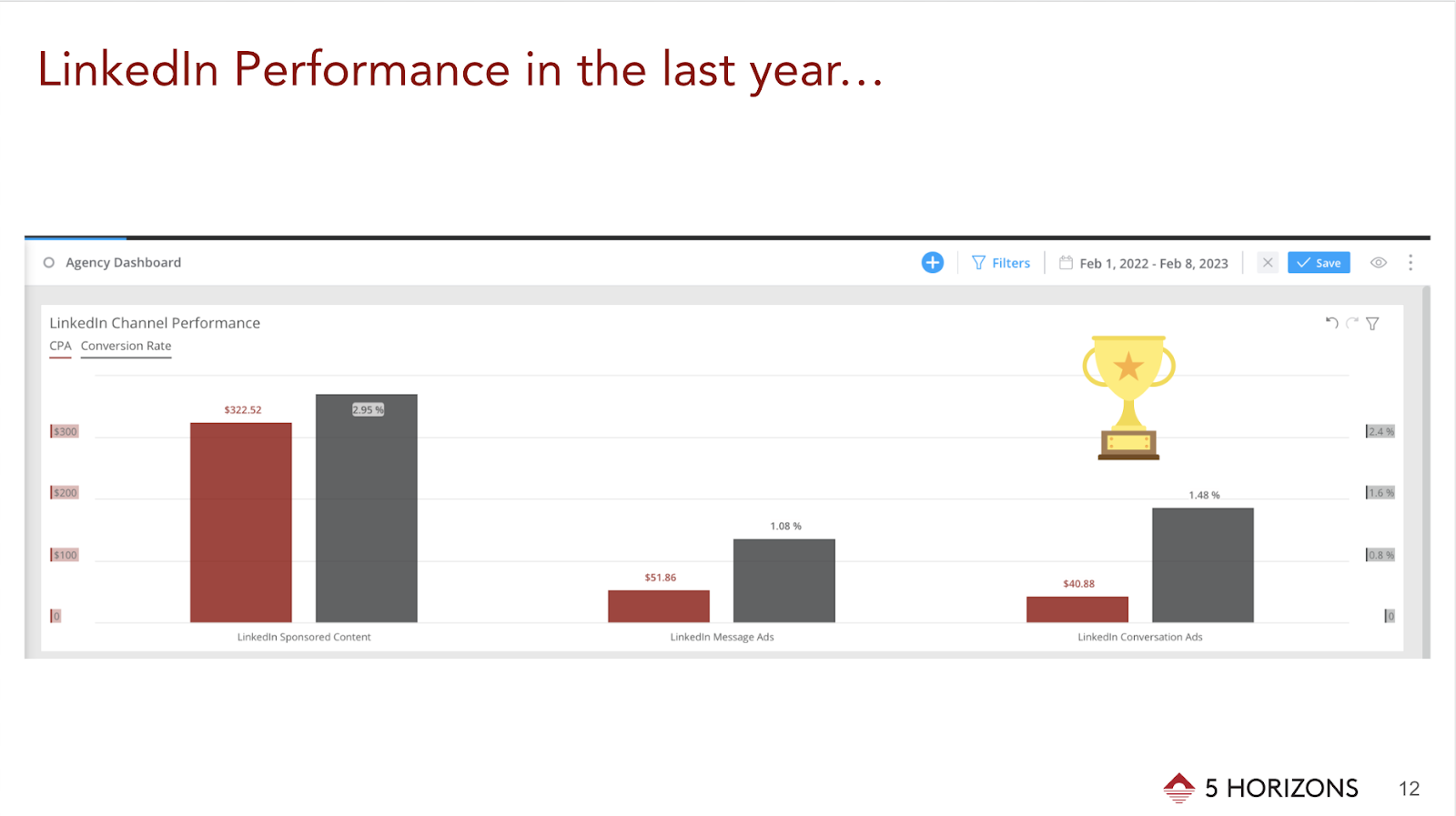
Through A/B testing, we learned that LinkedIn Conversation Ads performed best for our higher education clients and generated the most leads. We hypothesize that we saw such a significant increase in results because the Conversation Ad format provides just the right amount of context for people to act and request more information. 

Things to keep in mind when considering A/B testing for this platform:

Copy Length

Short and long copy speaks to how much information and details someone needs to take action, and experimenting with different text lengths can help establish best practices for the future.

Ad Formats 

LinkedIn offers a variety of ad formats to choose from, all of which can be put to A/B testing to find out which format is the most successful for specific objectives.

Text Ads

Text ads are a great format to use when the message is clear and concise—brand campaigns typically benefit from this LinkedIn ad type. When it comes to our practice, we don’t usually reach for this format because we run program-specific campaigns for our higher education clients. Through A/B testing, we learned that such campaigns perform better when additional copy and visuals are present.

Sponsored Content

This format works well for event ads or advertising programs at a brand level. We typically run in-app lead generation campaigns using this format with a program brochure or a “request more information” call to action as our incentives.

Conversation Ads

Conversation Ads tend to succeed when used for a program that may be unique or requires additional context. This strategy also works well for smaller clients because it goes directly to the users’ inboxes without having to fight for space in the feed.

Document Ads

Document Ads are new to Linkedin, but we anticipate this format to become a new way of advertising program brochures or any relevant learning materials that can be easily formatted as a .pdf file.

Images 

  • Images of people vs. images of objects: Sometimes a photo of a person in business attire works well for a client, other times a textbook with a client logo outperforms elsewhere. 
  • Branded imagery vs. non-branded imagery: Well-known brands typically generate better engagement rates when there is a logo associated with the image, whereas local or smaller brands can blend in with the feed through a more organic image, without any branding. 

These tips and resources can be used to start and better understand the importance of A/B testing for any brand or client. If you’re curious to learn more about LinkedIn, read our 2023 LinkedIn Updates and stay up-to-date on how to use the platform to its fullest potential.

The Inside 5 Horizons series includes stories and perspectives from our amazing team. Get a glimpse into our company culture each month by hearing the unique voices of our copywriters, strategists, project managers, and more.

June 8, 2019 Mountain View / CA / USA - Google office building in the Company's campus in Silicon Valley; The "double o's" of the logo are decorated in rainbow colors in honor of LGBTQ Rights

What Does it Mean to be a Google Premier Partner for 2023?

This St. Patrick’s Day it’s not luck, it’s hard work.


5 Horizons has been named a Google Premier Partner for 2023. Many of our clients come to us for Google Ads assistance. Becoming a Google Premier Partner takes a lot of time and hard work. 


“We’re excited to recognize your company as a 2023 Premier Partner and for being in the top 3% of partners in your country. Achieving Premier Partner status is an accomplishment worth celebrating, and distinguishes your company as a Google Ads expert to clients and the industry.” – Google


As a Google Premier Partner, 5 Horizons has achieved and exceeded all requirements, while demonstrating continuous success with:

  1. Certifications
  2. Ad spend
  3. Performance

Our team is constantly looking to improve our skills with Google Ads and this recognition is proof of it.

How Does That Help Our Clients?

As a Google Premier Partner, we receive a variety of benefits from Google, allowing us to provide additional services for our clients.

Benefits include:

  • Dedicated Account Management
  • Google Partner Search Listing
  • Client Event Support
  • Networking with Other Agencies
  • Executive Business Trainings for Our Employees
  • Dedicated Support Representatives & Teams
  • Annual Partners Summit & Review
  • Google Partners Badge 

Ready to Work With Us?

As Google Premier Partners, we know how to achieve success with Google Ads. Reach out to us today if you’re looking to improve your advertising strategy. 


Close-up of a man and woman clinking a white coffee cup in a coffee shop. while talking at work

Fostering a Fun Work Environment

Adding fun to your work can make productivity more sustainable and team building more meaningful.


By now the majority of us know that taking small breaks throughout the work day is important, not only for our mental health but for our productivity as well. However, taking breaks isn’t synonymous with having fun at work, a concept many employees in the modern world struggle with. As Bob Nelson of Harvard Business Review points out, the definition of fun varies from person to person, but there are a number of things any employee or employer can do to make the work experience—remote or in-person—more fun and enjoyable.

1. Make Conversation

Something as obvious and simple as starting meaningful conversations with coworkers can uplift the whole day. Whether it’s starting a staff meeting with a question about everyone’s weekend or closing it off with a personal anecdote, engaging in casual or non-work-related conversations with your colleagues can add more joy to your workday by helping you be more mindful of the people around you.

2. Put a Tune To It

Whether it’s a podcast or an exciting playlist, work is more fun with something else going on in the background. The core of team building is people, and distance is not an issue for creating a collaborative playlist with everyone in your company. If you are not easily distracted by sound, putting on music can put you in a better mood and give you the motivation to cross off your daily tasks. For example, 5 Horizons started an agency-wide crowd-sourced playlist called Beyond the Horizon that works wonders during afternoon slumps.

3. Start a Party

If a company-wide outing is an option, any activity with the word “party” in it is a guaranteed fun booster. Of course, virtual parties are a great team-building option, but getting people away from their computer screens and moving should be taken advantage of as well. Such outings can help employees get to know each other better and reinforce the essence of a team.


Fun is a catalyst for sustainable productivity, and an exciting working environment is one of the key factors for team building, whether we are in-person or remote. Hopefully, by trying out at least one of the suggestions above, you and/or your company can start incorporating more fun into the workday.