How to Establish a Successful SEO Strategy

Over the course of our Demystifying Search Engine Optimization (SEO) blog series, we learned about the different steps you can take to improve your SEO efforts. If you’re still wondering what the best SEO strategy is for 2024 and beyond, here are the main takeaways from the series.

1. Make technical SEO a priority

In the abundance of content, it’s easy to shift your focus from the foundation of any successful SEO strategy—technical SEO. It’s integral for you to keep your website architecture, internal linking, structured data mockups, and site loading speeds in check, ensuring a positive user experience and readability for Googlebots.

2. Set concrete goals

A successful SEO strategy is personalized to your brand or organization, so consider asking yourself: what are my SEO goals for this year? From optimizing your on-page SEO to centering your efforts around local SEO, take the steps that will directly help you achieve your personalized goals rather than a broader definition of SEO success.

3. Stay on top of SEO trends

SEO strategy is a continuous journey. While today marketers are preoccupied with the role of Artificial Intelligence (AI) in SEO, tomorrow might bring a new trend that will make everyone pivot their SEO efforts. Keeping up with SEO updates and best practices is essential, as long as you also continue making evergreen SEO strides, such as producing high-quality content and working toward specific SEO goals (e.g., increasing return site visitors).


Remember: you don’t have to do everything all at once. The internet is full of numerous “musts” when it comes to SEO, that’s why it’s vital to hold awareness and curiosity when it comes to Search Engine Optimization. Consider implementing bite-sized steps toward improving your SEO strategy and come back to our Demystifying SEO series whenever you need a refresher on SEO basics. For more expert tips and exceptional SEO services, contact 5 Horizons today.

Bite-Sized SEO for a Limited Budget

Since Search Engine Optimization (SEO) isn’t a one-and-done process, it can easily overwhelm an organization’s resources. SEO is so much more than keyword research and content generation, and there are bite-sized efforts anyone can take to enhance their organic search results. Here is what the experts on our team recommend:

1. Focus on Local SEO

Local SEO is one of the higher-impact, lower-cost items. If you have a brick-and-mortar location and set business hours, this is a must. At its most basic, this step involves reviewing Google’s guidelines for local SEO and making sure your Google Business Profile, as well as Meta, Bing, and other platforms where your listing appears, are accurate, complete, and kept up to date. Consistency is important, so this is a place where you might consider paying the small monthly fee for a service that monitors and manages your listings to ensure your company information matches across all directories. Read one of our previous blogs in this SEO series to learn more about putting your business on the map with Google Business Profile and other tips on implementing a local SEO strategy.

2. Reframe Your Approach to Content

Quality content is important for SEO rankings and creating an engaged user experience. Focus on leveraging your team for ideas. Encourage them to track questions that clients and customers ask, as those can become topics for future content pieces. For those with the resources to generate relevant content themselves, 5 Horizons offers site reviews, competitor gap analysis, keyword research, and creative brief development to inform your content creation. Tip: If you don’t have the resources to write new content yourself or hire somebody to do it, try featuring your social feed on your website. This may require some up-front development work, but as long as your social channels are updated frequently, this can provide fresh content to encourage audience engagement.

3. Monitor Technical SEO and Website Performance

It’s vital for you to continuously look at and promptly adjust your website’s technical performance. Technical SEO can be monitored in Google Search Console, which will give you insights into major technical issues, such as broken links (404 pages). Page Speed Insights is a great resource that looks at Core Web Vitals, which are important web page performance metrics that can help you identify problems such as slow loading speeds and poor mobile performance. These services don’t cost anything and can help you significantly optimize your website.


Even when resources are limited, SEO is an important part of your web presence. Applying even a few additional steps to your existing SEO efforts could increase your search engine rankings and help you connect with your target audience. At 5 Horizons, we work with different SEO budgets and customize our approach for each client. Contact us to discuss how we can help your business grow, and read other blogs in our Demystifying SEO series.

Technology background of the abstract computer motherboard, can be used in the description of technological processes, science, education. Can be used as digital dynamic wallpaper. 3d rendering

Unlocking SEO Potential at MozCon

A Look Back at MozCon 2023 as We Prepare for the 2024 Conference


In August 2023, our technology team attended MozCon 2023 in Seattle and spent two full days learning, talking, and exploring innovative ways to implement Search Engine Optimization (SEO) and all of the facets that surround best SEO practices.

Our team arrived back on the east coast ready to share all of their ideas with the full company and begin implementing everything they learned. After spending some time putting their new education into practice, they have highlighted the greatest takeaways from last year’s conference.

Here are the top three topics that our team highlighted as most important after MozCon 2023:

1. Google is a Digital Ecosystem

Google is only one search engine among many, but it stands out from all the rest because of its broad expanse of offerings. Google is now a social network, a business directory, a place to shop, a place to image search, an aggregator, and a personal assistant––all rolled into one.

Thinking of Google as a digital ecosystem encouraged our team to incorporate all Google had to offer into our strategy and web presence going forward. SEO is equally interconnected and needs to be woven into all layers of content, campaigns, websites, and ads from start to finish. Google is currently the expert on users’ motivations for search and data collection, making Google the key to connecting with targeted audiences.

How our team is using Google differently in 2024:

  • Not thinking of Google solely as a search engine
  • Not getting sucked into the algorithm-thinking SEO practices
  • Using Google’s offerings to find and retain target audiences
  • Exploring content beyond just web pages––especially indexed YouTube video
  • Focusing on identifying local link opportunities in addition to traditional backlinks

2. GA4 Offers Privacy Conscious User Data

Google Analytics 4 (GA4) is a customizable tool our technology team uses to measure traffic and engagement across the websites that we create, optimize, monitor traffic, and study user behavior. In order to address privacy concerns, Google moved away from Universal Analytics (UA) and implemented the GA4 data structure to collect, store, and use data in a way that is compliant with privacy regulations in different countries/states while focusing on events rather than sessions. It uses modeling to estimate conversion data that can’t be observed directly without identifying users. GA4 aims to collect user web and app data  in a privacy conscious manner while preparing for a cookieless browsing future.

How our team is leveraging GA4 in 2024:

  • We are using GA4 to track user behavior and sources of traffic
  • We are using the funnel report builder to analyze flows and track conversions
  • We are customizing our team’s navigation for easy access to useful reports
  • We are building custom audiences and using them for remarketing in Google Ads
  • We are using GA4 to measure the impact of our paid media efforts 
  • We are using GA4 to create custom reports to extract key insights for decision making 

3. AI and the Rise of Large Language Models

Artificial Intelligence (AI) is not new, but universal accessibility to it is. Like many, our team regards AI with equal parts skepticism and curiosity. While at MozCon our team approached new information about AI with an open mind and challenged their own beliefs to embrace experimentation.

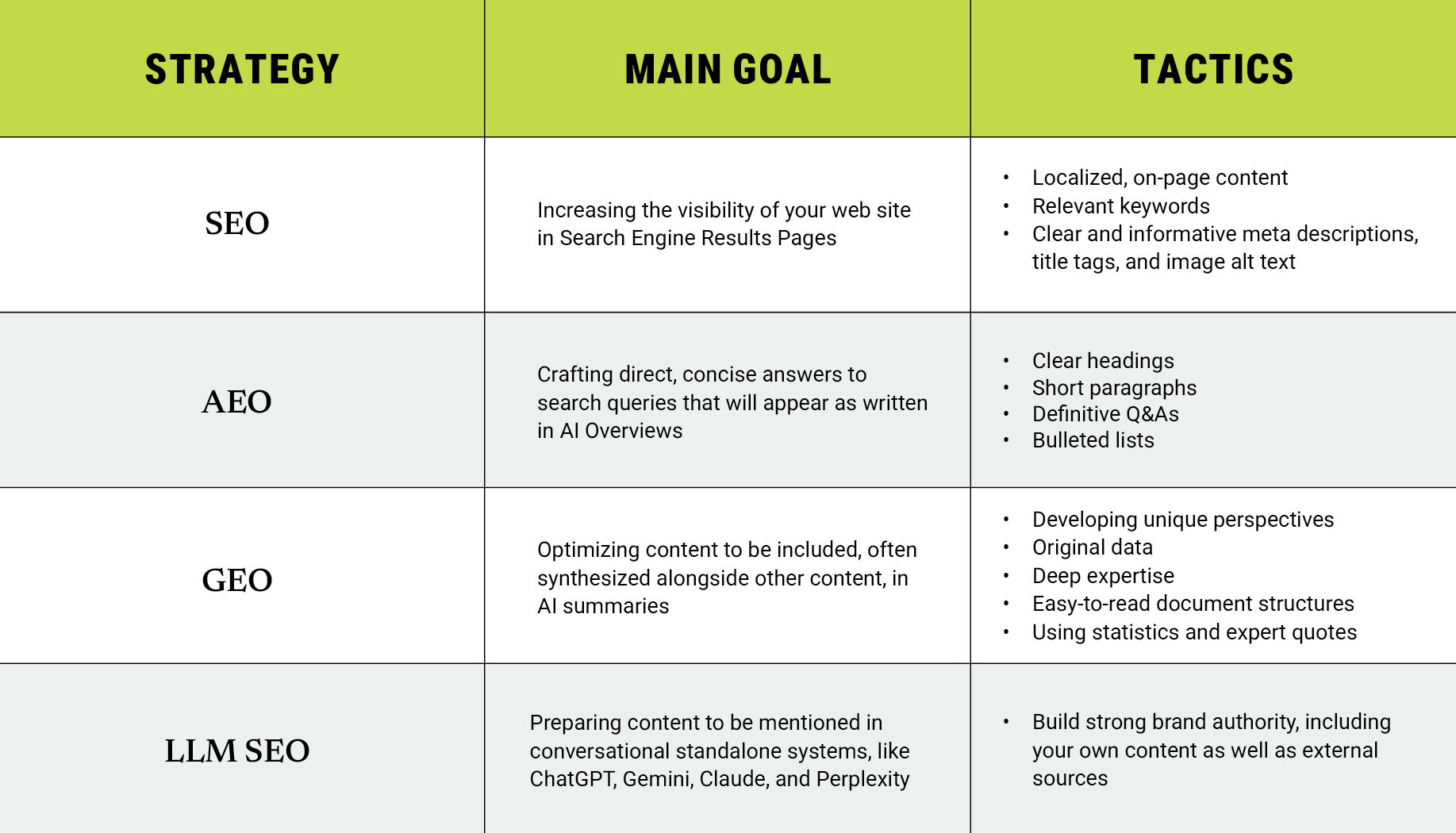
ChatGPT is a natural language processing tool developed by OpenAI to generate human-like text based on input. OpenAI trained ChapGPT on a massive amount of text data from the internet, using a machine learning model known as a large language model (LLM). ChapGPT “learns” by identifying patterns in the data and uses them to make predictions.

After Open AI launched ChatGPT, many companies such as Microsoft and Google started to integrate ChatGPT into their search engines or created their own LLMs, such as LaMDA/Bard and Bing Chat.

How our team is leveraging AI in 2024:

  • Increasing efficiency as a digital partner and personal assistant
  • Solving problems and expanding research
  • Learning better skills for prompting AI
  • Integrating ChatGPT functionality into other applications
  • Increasing transparency when using AI and sharing it’s benefits with each other
  • Continuing to explore all that AI has to offer our company workflow

Our technology team was thrilled to learn all they could from MozCon in 2023 and are very excited to gain even more exposure to new technologies at MozCon in 2024.

Education is at the heart of everything we do. If you are looking for a partner who is constantly exploring and learning new technology, we are ready to share our knowledge with you and solve your digital marketing problems. Let’s connect!

Computer Keys Keyboard Scattered on White Background

How to Write Effective Alt Text

Alternative text (alt text) is an important part of website optimization. But how do you write it effectively, for the people with visual impairments and for the search engines? Follow this step-by-step guide to writing good alt text.

Examine your image closely 

What is happening in the image? What information is it conveying? What would a viewer be missing if they couldn’t see this image? 

Mention the specific image medium

Your viewer’s screen reading program will tell them that it is an image, but not what kind. Is it a photo, an illustration, or an infographic? This detail will help your audience understand your content much better and take action if it calls for one. When writing alternative text, be as specific as possible, instead of simply stating “image of…”

Include all important elements 

Consider everything, even what is being implied. Is the image conveying a mood, activity, etc. not mentioned elsewhere? 

If the image has text, write it out

Graphics, posters, and other designed image content frequently feature copy. Make sure to write it out when working on your alt text.

Consider the image’s layout

If the layout is essential, include details about it in your alt text.

Consider uX while writing alt text

Keeping user experience in mind will help you determine which elements add to the website experience and which don’t. For instance, decorative images that serve no function beyond aesthetics do not require alternative text. 

By following these steps, you can ensure that your visual content is accessible to everyone and helps your site rank higher in search results. Learn more about Alt Text Best Practices.

Need help reaching your digital advertising goals? Connect with us to learn more

Magnifying Glass on white computer keyboard on white desktop with accessories.

Google’s Changes to FAQ and HowTo Results: What Website Owners Need to Know

As of September 2023, Google reduced the visibility of FAQ and HowTo information in its search results. If you haven’t seen the impact of this decision on your website’s traffic yet, here is everything digital marketers and website owners should know if considering rethinking their strategy.

FAQ Results

Google now limits the regular display of FAQ-rich results to well-known and authoritative websites, primarily in the government and health sectors. Google’s algorithm will determine which websites fall into these categories.

HowTo Results

Attempting to simplify search results, Google no longer shows HowTo rich results on desktop or mobile devices. For this reason, this search result type has significantly lost its value.

What Changes Do You Need to Make

If your site features structured data, you don’t have to proactively remove it. Though it has no visible effects in Google Search, it’s not going to cause any problems either. FAQ and HowTo Schema markup may also continue to be useful for other search engines, aiding in content indexing and rich result display in SERPs.

Impact on Website Traffic

Google doesn’t consider this global update a ranking change, so the effects of FAQ’s and HowTo’s reduced visibility remain to be fully felt. Most likely, the removal of these sections from SERPs will lead to more search results displayed on a single screen, increasing the competition for clicks. Website owners who currently employ FAQ and HowTo Schema markup should prepare for potential traffic fluctuations, which may vary based on context and the type of website you have. 

Staying up-to-date on Google’s updates and closely monitoring your website’s performance can help you effectively adapt to the evolving search result dynamics. And with 5 Horizons, you can always stay on top of digital marketing industry trends.

Inside 5 Horizons: Internal Linking Best Practices

Our Tech Team’s guide for identifying and implementing effective internal links in your website.

A well-built and maintained website makes it easy for users to find what they’re looking for. Internal links are critical for guiding navigation, building authority, and increasing keyword visibility. 

  • Identify focus keywords for important pages.
  • Use those focus keywords as anchor text to link to those pages from other pages or content pieces.
  • Add links selectively and strategically.
  • Document content strategy, including anchor text and internal links, to avoid cannibalizing rankings from other pages.
  • Review page performance and then adapt and optimize according to fluctuating page rankings.

This guide explores important considerations for identifying and implementing effective internal links.

Why Internal Links Matter

Your site’s domain authority is directly impacted by how long visitors stay on your site, how many pages they visit, and how deep into the site architecture they go. 

Every time you add a new page or post to your website, consider the interconnection between all of the pages on your site. Be sure to identify opportunities for linking to internal site pages. These links help site visitors access valuable content on your site rather than looking elsewhere.

Create and Maintain a Clear Content Strategy

A well-documented and maintained content strategy helps you define what you’re going to write about when, specific keywords to include, and opportunities for internal linking. Documenting the keywords that pages are targeting can help you avoid cannibalizing rankings.

Be intentional when deciding what links to add to any given page, and make sure that the included links are relevant to other page content and utilize keywords as anchor text. 

Think About User Experience

While you don’t want them simply clicking in circles for the sake of clicking, you do want to provide them with easy ways to find what they’re looking for, as well as valuable information that may enhance their experience.

When your site visitors click on a link, they’re trusting you to reward them with valuable content. Therefore, the anchor text used should align with what they’re going to find on the other side.

Avoid page-stuffing with unnecessary or unrelated links. Not only will that negatively affect user experience, but the search engines are sophisticated enough to know that’s what is being done.

Be Selective About When to Link

There’s no need to make every instance of a keyword linkable. In most cases, this means only hyperlinking the keyword or phrase (e.g., program name) the first time it appears in the piece. 

But consider the context when deciding which instance to actually link. For example, in a piece exploring the differences between MBA programs where each program has its own section, we’d suggest linking each program name as it appears in its section heading. This would extend to MBA as well, rather than hyperlinking the first occurrence in any intro copy.

Add Value to Your Links

Hyperlink text that only says “click here” or “learn more” are meaningless to search engines and forfeit opportunities to build domain authority. Instead, try to use keywords as the hyperlink text. 

Rather than using “click here,” lead in to your hyperlink with text that adds value such as “download our brochure about [Program Name]” or “sign up for our [Program Name Infosession]” or “complete our inquiry form to learn more about [Program Name].” And rather than hyperlinking that whole sentence, put the hyperlink on the text that aligns closest to your focus keywords.

It’s worth noting that this is not talking about call to action (CTA) buttons, especially when it comes to “learn more.” CTA buttons are usually concise and adjacent to contextual copy.

Connect Users with Supporting Pages and Content

Internal links provide opportunities to guide users to information that may not be highly visible in the navigation. When you’re writing a content piece, think about other pages, content, and topics that might be relevant to the reader. Start by optimizing the content and meta data to try to attract more organic traffic. 

Then you can add links to other relevant pages directing traffic to the less visible page using focus keywords. Also consider adding content pieces that highlight the keywords associated with the page you’re trying to highlight.

The Inside 5 Horizons series includes stories and perspectives from our amazing team. Get a glimpse into our company culture each month by hearing from the unique voices of our copywriters, strategists, project managers, and more.

How to Make Google Calendar Meeting Guests Optional

How to Make Google Calendar Meeting Guests Optional

Let your guests decide for themselves whether they want to attend a meeting with this feature.


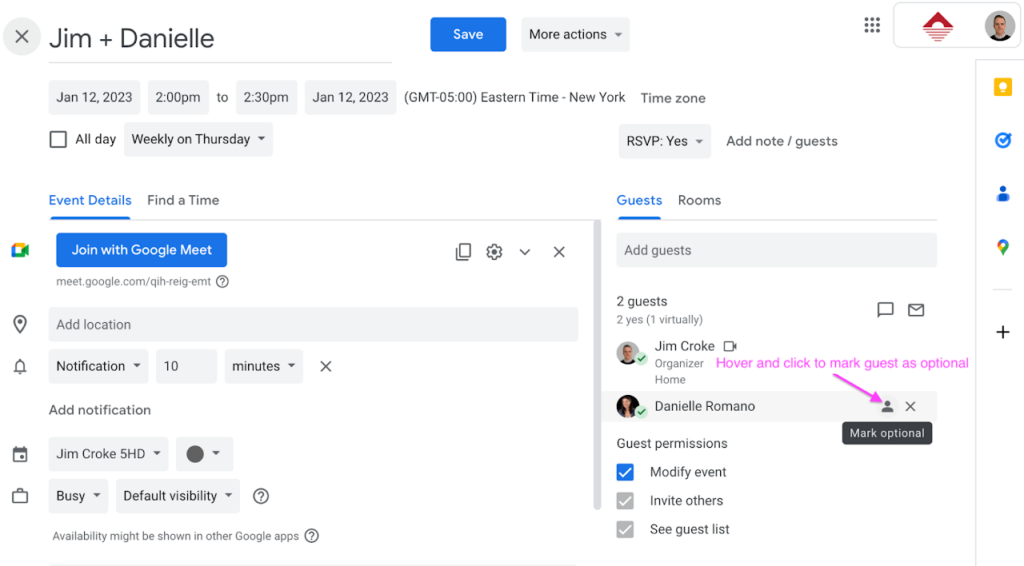
In a company as busy as ours, Google Calendars can fill up fast. To lighten someone’s meeting schedule, you can mark a guest as “optional.” 

Hover on the gray user icon to the right of the guest’s name and click it to mark the guest as optional. You can do so at the time you create the event or edit it afterward. With this feature, your staff can choose whether they want to attend low-priority meetings.


Follow our blog for monthly tech tips and insights into the world of digital marketing.


Group of young creative people in a pleasant atmosphere in the office is clapping to a lecture held by their boss

Make Your Google Slides Presentation Pop

Tips for crushing your next visual presentation.


A key element of a captivating slide show is its aesthetics. Making your visual presentation stand out can help retain your audience’s attention and share your information in a digestible and easy-to-follow manner. Here are six tips you can implement in your next presentation:

1. Use presentation templates to save time and keep your design streamlined

Google Slides comes with 20+ default templates to choose from, which can help you save time and energy on design. Of course, if you want your presentation to be tailored to your business, consider spending some time designing a new template that follows the guidelines of your brand or building off of an existing one. Once you design the template, it can be reused for future presentations, keeping your style streamlined and coherent.

2. Stick to brand colors and fonts for professional representation

Whether you are using your brand’s custom template or not, a clean aesthetic can be achieved by following your brand guidelines when it comes to colors and fonts used in your presentation. A consistent slide style can help the content shine, without too many colors and fonts distracting from the main information you are looking to convey.

3. Match fonts to your topic of discussion 

Just like the subject matter, fonts have their own personalities. The key to making a good impression with your font is to make sure it matches the topic of your discussion, so keep that in mind when debating between using a serious or a more playful font.

Extra tip: Don’t mix more than three fonts in one presentation. Just like when it comes to colors, you should prioritize consistency and brand style to keep your slides looking straightforward and not too busy.

4. Use transitions in moderation

Transitions are a great tool for visualizing moving from one thought to another within a presentation. Just like the majority of Google Slides features, transitions are best used in moderation. Save them for when you are switching topics or include one at the end, when you are offering an opportunity for your audience to ask questions or share feedback.

5. Utilize infographics to make data more digestible

Nothing makes eyes glaze over faster than long blocks of text on every slide. Infographics and charts are great visual tools you can use to highlight the necessary information and data in a streamlined and digestible manner. Making heavy material accessible to your audience is an important factor in a successful slide presentation.

6. Don’t be afraid to get creative: videos, gifs, memes, and 3D images are all eye-catching

All of these visual forms of media can help your audience relate to and connect with your presentation better, further capturing their attention. Of course, as with everything else, moderation is key, but embedding videos and other creative content can make your presentation stand out. And there is nothing quite like a context-fitting gif to liven up your slides.


As insightful as your content might be, the way you present it can make or break a presentation. Incorporating the tips above into your Google Slides will ensure your audience remains engaged and involved in the information you are sharing and helps you make a lasting impression.