Project manager working on laptop and updating tasks and milestones progress planning with Gantt chart scheduling interface for company on virtual screen

Inside 5 Horizons: 3 Tips for Efficient Project Management

Hear from Amelia Morrill, our Director of Project Management & Operations, as she shares her top suggestions for managing, implementing, and completing successful projects.

Managing people and workflow involves a balance of skills. Sticking to a schedule, keeping projects under budget, and communicating across teams are just a few of the responsibilities project managers have to navigate on a daily basis. Luckily, these three tips from Amelia can help people in project management roles stay on track:

1. Get a Buy-In from Everyone Ahead of Time

Before distributing tasks across the team, project managers should work with all involved parties to set up agreed-upon steps and deliverables. Doing so helps anticipate potential questions and roadblocks, outline each stage of the project timeline, and write out concrete expectations for final outcomes.

2. Establish Milestones

For large or multi-step projects, project managers should establish deliverable and approval milestones that need to be met before proceeding to the next phase. Such breakdowns of larger tasks create checkpoints that allow every member of the team to take actionable steps and achieve attainable goals.

3. Use Project Management Tools

Task management tools and software are project managers’ best friends. Using software such as Asana, Basecamp, Monday.com, Trello, and Jira can significantly streamline the process. Taking advantage of the project management tool’s features can help people stay organized, communicate with internal teams and clients, and delegate tasks.

Amelia utilizes these main tips to stay on schedule, support her team, and deliver the highest quality of work to our clients. Optimizing project management with these tips helps successfully complete any task, big or small. 

How can our success with project management help you reach your goals? Connect with us to learn more.

The Inside 5 Horizons series includes stories and perspectives from our amazing team. Get a glimpse into our company culture each month by hearing from the unique voices of our copywriters, strategists, project managers, and more.


Inside 5 Horizons: Internal Linking Best Practices

Our Tech Team’s guide for identifying and implementing effective internal links in your website.

A well-built and maintained website makes it easy for users to find what they’re looking for. Internal links are critical for guiding navigation, building authority, and increasing keyword visibility. 

  • Identify focus keywords for important pages.
  • Use those focus keywords as anchor text to link to those pages from other pages or content pieces.
  • Add links selectively and strategically.
  • Document content strategy, including anchor text and internal links, to avoid cannibalizing rankings from other pages.
  • Review page performance and then adapt and optimize according to fluctuating page rankings.

This guide explores important considerations for identifying and implementing effective internal links.

Why Internal Links Matter

Your site’s domain authority is directly impacted by how long visitors stay on your site, how many pages they visit, and how deep into the site architecture they go. 

Every time you add a new page or post to your website, consider the interconnection between all of the pages on your site. Be sure to identify opportunities for linking to internal site pages. These links help site visitors access valuable content on your site rather than looking elsewhere.

Create and Maintain a Clear Content Strategy

A well-documented and maintained content strategy helps you define what you’re going to write about when, specific keywords to include, and opportunities for internal linking. Documenting the keywords that pages are targeting can help you avoid cannibalizing rankings.

Be intentional when deciding what links to add to any given page, and make sure that the included links are relevant to other page content and utilize keywords as anchor text. 

Think About User Experience

While you don’t want them simply clicking in circles for the sake of clicking, you do want to provide them with easy ways to find what they’re looking for, as well as valuable information that may enhance their experience.

When your site visitors click on a link, they’re trusting you to reward them with valuable content. Therefore, the anchor text used should align with what they’re going to find on the other side.

Avoid page-stuffing with unnecessary or unrelated links. Not only will that negatively affect user experience, but the search engines are sophisticated enough to know that’s what is being done.

Be Selective About When to Link

There’s no need to make every instance of a keyword linkable. In most cases, this means only hyperlinking the keyword or phrase (e.g., program name) the first time it appears in the piece. 

But consider the context when deciding which instance to actually link. For example, in a piece exploring the differences between MBA programs where each program has its own section, we’d suggest linking each program name as it appears in its section heading. This would extend to MBA as well, rather than hyperlinking the first occurrence in any intro copy.

Add Value to Your Links

Hyperlink text that only says “click here” or “learn more” are meaningless to search engines and forfeit opportunities to build domain authority. Instead, try to use keywords as the hyperlink text. 

Rather than using “click here,” lead in to your hyperlink with text that adds value such as “download our brochure about [Program Name]” or “sign up for our [Program Name Infosession]” or “complete our inquiry form to learn more about [Program Name].” And rather than hyperlinking that whole sentence, put the hyperlink on the text that aligns closest to your focus keywords.

It’s worth noting that this is not talking about call to action (CTA) buttons, especially when it comes to “learn more.” CTA buttons are usually concise and adjacent to contextual copy.

Connect Users with Supporting Pages and Content

Internal links provide opportunities to guide users to information that may not be highly visible in the navigation. When you’re writing a content piece, think about other pages, content, and topics that might be relevant to the reader. Start by optimizing the content and meta data to try to attract more organic traffic. 

Then you can add links to other relevant pages directing traffic to the less visible page using focus keywords. Also consider adding content pieces that highlight the keywords associated with the page you’re trying to highlight.

The Inside 5 Horizons series includes stories and perspectives from our amazing team. Get a glimpse into our company culture each month by hearing from the unique voices of our copywriters, strategists, project managers, and more.
Using HTML5 for Animated Banner Ads

GIF vs HTML5—which one do our web developers use to create banners and why?

Animated banner ads can be created in GIF or HTML5 formats. What’s the difference between the two?

A GIF file consists of a series of frames that play in a sequence, creating a looping animation. HTML5 banners, on the other hand, are programmed with multiple lines of code and images. 5 Horizons’ Front End Development team thinks HTML5 ad banners are superior to GIF ones for these three reasons:

1. Interactivity

Developers use different scripts such as CSS and JavaScript to create HTML5 banners. This gives them creative freedom to build engaging online HTML5 banner designs. GIFs, however, are looping animated images, which means they lack interactive elements and smooth transitions.

2. Size

GIF banner ads are bulky, which can pose major complications when uploading to the clients’ platform of choice. Whereas HTML5 ads are small bits of code that load quickly and stay under the required platform file size. For this reason, HTML5 is the preferred file size for most vendors.

3. Color

It’s no surprise that the 8-bit GIF file is slowly becoming obsolete in the digital ad space since it offers a low range of only 265 colors. Comparing that to HTML5 banners, which can display about 16.7 million colors while still loading faster than GIF files.

HTML5 banner ads are vibrant, dynamic, and their technology is improving day by day, while GIF ads are slowly falling by the wayside. Digital marketing experts at 5 Horizons stay up-to-date on industry standards, trends, and innovations. Contact us if you want to place high-quality banner ads or have any other advertising needs.

Instagram Reels: Best Practices Guide

Use this simple guide to better understand and implement vertical video content in your social media efforts.

Reels, which were first introduced to Instagram back in 2020 to compete with TikTok, are now among the most popular vertical video content. Many companies with a preexisting Instagram presence should tap into Reels to grow their brand and promote their business.

Our Social Team has put together this best practices guide to help our clients make the best out of this short-form 90-second video format.

1. Follow the Trends

Using a trending sound is one of the most effective ways to capture more audiences. Keep an eye out for trends by scrolling through the Reels tab on Instagram and seeing what other creators (or even competitors) post. If you see something gaining traction, make sure to commit to it quickly, because trends come and go really fast!

2. Add On-Screen Text & Captions to Your Videos

Since 69% of video is watched without sound, it’s crucial to always add on-screen text and subtitles to your Reels. That way, you’ll reach more users and make your videos more accessible to people with hearing impairments.

3. Stick to Your Voice & Niche

Though trends are exciting, not all of them align with every business’ mission and goals. You are likely to see results from consistently posting reels that speak to your brand and help your audiences get to know you and your team better.

4. Avoid Horizontal Video

One of the most important evergreen tips is to keep vertical videos, such as Reels, vertical. If your institution has a high-quality horizontal video, it might be better suited for other platforms, such as YouTube, or as a post on any of the Meta platforms. Create Reels with the ideal aspect ratio of 9:16 and size them 1080 x 1920 pixels. That will make the Instagram algorithm more likely to favor your content and show it to users.

5. Use Tools & Hashtags

Take advantage of Instagram’s built-in features that help streamline the process of Reel creation. You can trim and delete video clips within the app and use Templates of other Reels to make your content match the trending sound perfectly. Before uploading your Reel, make sure to include 3-5 hashtags to help the algorithm better understand your content and offer it to the right audiences.

Keep in mind that most of these guidelines can be applied to not only Instagram but other platforms and types of vertical content as well. That includes Facebook Reels, TikToks, and Stories on both of the Meta social media platforms. 

Do you want to further increase your brand’s visibility? Contact us to learn more about how we can help you achieve your social media goals.

Group of green sprouts growing out from soil

Inside 5 Horizons: It’s Organic! Growing Your Social Media Audience

Hear from our Lead Copywriter, Abigail Egan, as she discusses her favorite tips for growing social media audiences organically.

There is a lot of conflicting advice on the internet about how to grow social media–follow the trends, but be completely unique; stay true to your brand, but don’t overuse your logo or brand colors; create widely shareable content, but narrow your content for a specific audience.

Social media strategies should be unique to individual companies and organizations, but there are a few general tips all campaigns, of any size or focus, can utilize to increase success.

Grow your social media audience organically with these three guiding principles:

1. Set Goals for Your Growth

Growing your accounts organically can be a slow process, but setting goals will keep you on track for steady, high-quality growth. Maybe your goals are to utilize a new hashtag, find other companies in your industry to network with, or solidify your brand style more publicly. Expand your goals beyond just numbers and think about the broader impact and message your social content is making online.

2. Tailor Content for Different Platforms

Your audience across platforms is going to vary, so it’s safe to say your content should too. Do some research on your audiences and learn what type of content resonates the most on each platform. Different audiences, on different platforms, will react uniquely to different content. 

Try to avoid pigeonholing your audiences. Give them a variety of content to interact with in new ways, emphasizing the areas where you see the most engagement. Do articles resonate on LinkedIn, but not on Instagram? Do video interviews have more reach on Facebook, rather than Twitter? Test your theories, collect your data, and adjust your platform-specific strategies to match the results.

3. Be Consistent & Have Some Fun

Prioritize consistency over perfection when you’re planning your content schedule. Consistent posts will get your account on users’ feeds more often, creating a feeling of familiarity with your brand.

The Marketing Rule of Seven states that a consumer is most likely to buy or interact with a product or company after seven separate, unique touchpoints. With social media being as saturated as it is, with advertisements, sponsorships, and brand deals, that number is likely higher than seven in 2023.

At 5 Horizons, we aim for three categories across our social content: Professional, Community, and Human. We know that a mixture of industry insights, current events, and fun content is a good balance of branded and approachable content. Creating a variety of content also allows us to produce more social assets on a consistent schedule.

Not every post should be branded or pushing for viewers to take an action—sometimes sales have to take a back seat. You want your audience to be authentic users, not just faceless followers, so consider having a little fun with your content. Maybe your brand allows for a little more personalization, or perhaps humor aligns with your company culture. Not sure what direction you should take? Create a few test posts and watch closely to see how your audience engages with the content, or give organic A/B testing a shot.

Grow your social media audience organically with these three guiding principles, or reach out to our team for assistance!

The Inside 5 Horizons series includes stories and perspectives from our amazing team. Get a glimpse into our company culture each month by hearing from the unique voices of our copywriters, strategists, project managers, and more.

Light bulb with a dark background, light outline of a brain in the bulb with sparks coming off of it. Boca lights in the background.

Artificial Intelligence in Marketing

The future of AI and its effects on optimizing marketing services.

With ChatGPT and Artificial Intelligence (AI) being the new buzzwords of the year, it’s impossible not to wonder about the future of AI, particularly its relationship to marketing. 

People all over the world could not get enough of ChatGPT, the chatbot developed by OpenAI, ever since its launch in November of 2022. But with the fascination over the new technological advancement, came fear. Concerns rose over AI’s safety, ethical implications, and, of course, jobs.

The reality remains that the current job market will likely change, but not in a way people might expect. Instead of AI taking over people’s jobs, many roles will evolve into working together with artificial intelligence in a mutually-beneficial, somewhat symbiotic relationship. 

We predict marketing to become one of the industries that will see a lot of AI-driven rapid change. Here are some examples of exciting possibilities for incorporating AI into aspects of marketing:

1. Optimized Workflow

With so many moving parts, advertisers can benefit from AI at different stages of the process. Copywriters and art directors especially can use AI to expedite their research before starting work on any campaign or creative project. A more precise and targeted supplement to search engines such as Google, ChatGPT provides detailed, tailored information that directly answers users’ queries. Moreover, AI can optimize consumer segmentation and forecast people’s behaviors, which results in delivering more constant and customized communications and ads to customers.

2. Content Marketing

One of the biggest attributes of working together with AI is its ability to optimize content creation. From determining the odds of a particular piece of content going viral to suggesting what content visitors would like to see, AI can serve as a never-ending source of strategy-driven ideas for content marketing. Over the recent months, machine learning engineers have been working to further optimize ChatGPT’s text-to-video and text-to-audio capabilities, which can further help brands and marketers customize their content to specific viewers and capitalize on the popularity of interactive visual media.

3. Social Media

As an ever-popular facet of marketing, social media can also be automated with AI. Beyond determining which content gets seen, AI can help brands by matching products and services with people who have already cultivated the desired targeted audiences. Playing such an essential part in influencer marketing, AI can further analyze those audiences, recognizing which ones will result in quality engagement. Results in general, from campaign metrics to ROI, are other tasks that can also be handled by AI, evaluating campaign performance and learning from the outcomes.

Artificial intelligence and its partnership with marketing will continue to evolve. With an array of future possibilities, we hope that such a relationship will continue resulting in more streamlined and optimized advertising efforts, benefiting brands, clients, marketers, and consumers.

Indian business man wearing headset having virtual team meeting on video conference call using laptop work from home office talking to diverse people group in remote teamwork online distance chat.

Google Slides Presentation Tips

Giving a Google Slides Presentation in Google Meet, while still seeing your speaker notes and your audience, can be tricky. Our IT team has outlined the process to make your next presentation look professional and operate smoothly.

We recommend practicing these steps first before your actual presentation to make sure your technology is working properly.

1. Log into a Google Meet

At this time, you can adjust your visual layout to see the other attendees:

  1. Click on the three vertical dots, then “Change Layout.”
  2. Choose between Auto, Tiled, Spotlight, or Sidebar for how you want your layout to look. An Auto selection will allow your screen to adjust according to different attendees’ presentations.
  3. Use the Tile Slider to increase the number of attendee tiles you will see based on the size of your screen.

2. Present a Google Slides Presentation

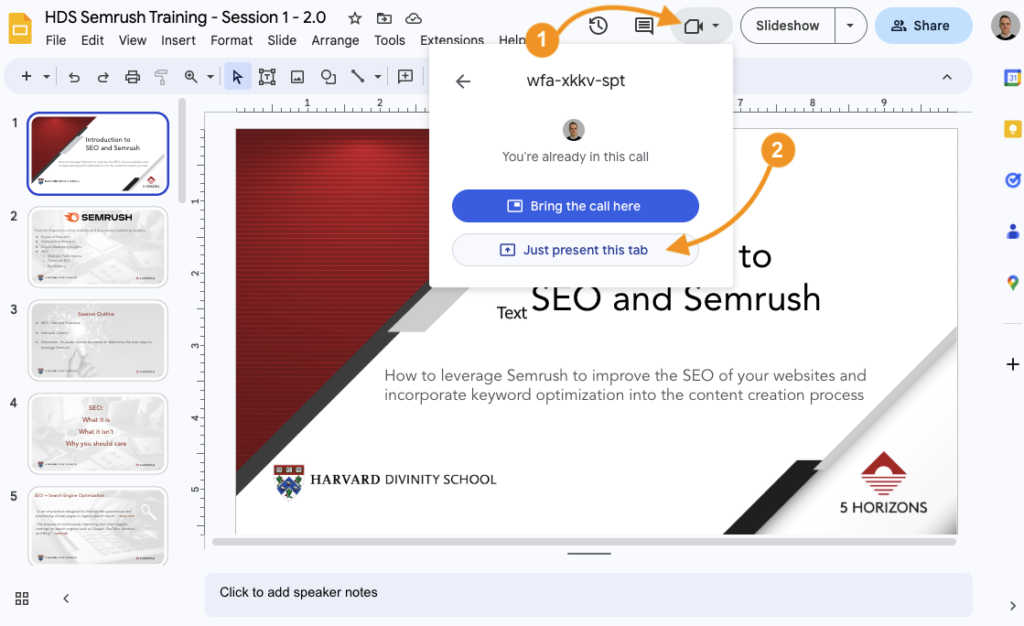
  1. Navigate to the Google Presentation and click on the Video Camera icon in the top right of the screen.
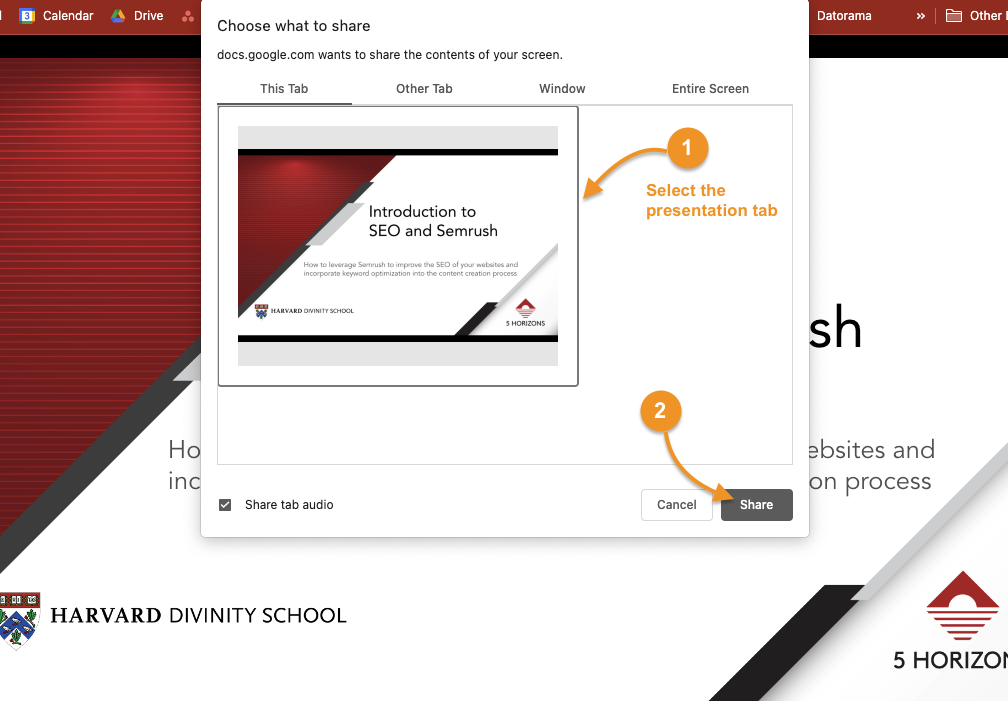
  2. Select “Just present this tab.”
  1. Select the presentation under the “This Tab” heading.
  2. Click “Share.”

3. Present from Google Meet

Presentation Controls

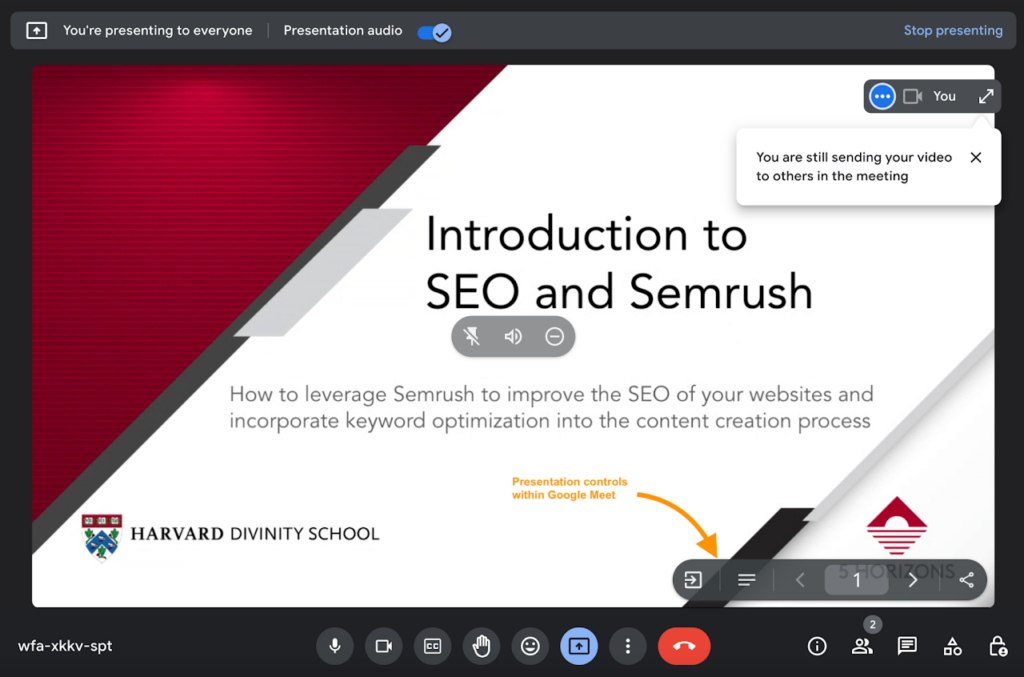
  1. Navigate back to the active Google Meet.
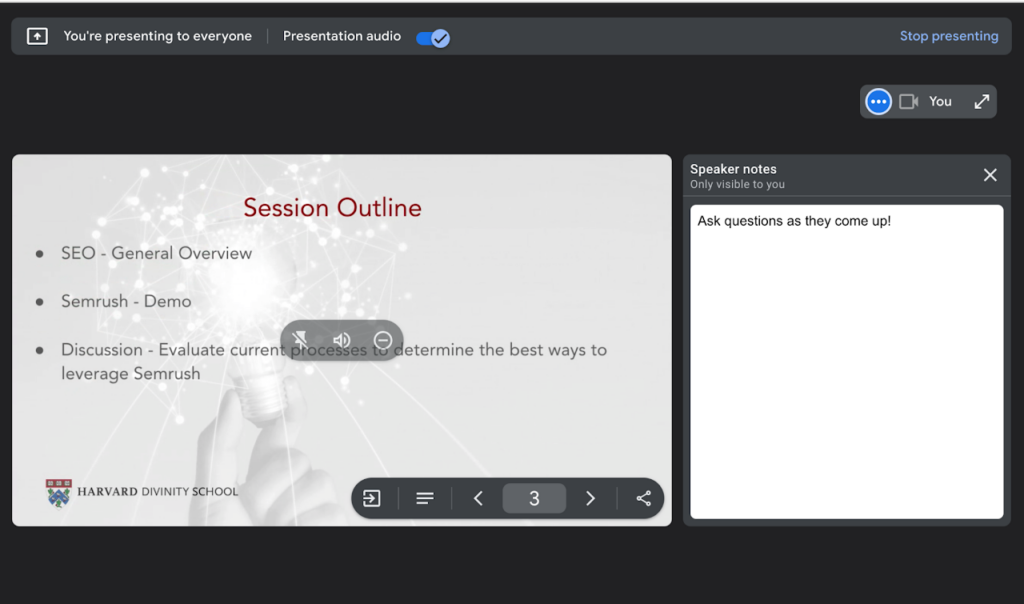
  2. The screen will now display your presentation and controls for you to conduct the meet directly in the Google Meet.

As you give your presentation, you can either use the forward and back (< >) icons in the Google Meet window to move through your deck, or you can navigate within the Google Slides Presentation window on your computer.

Speaker Notes

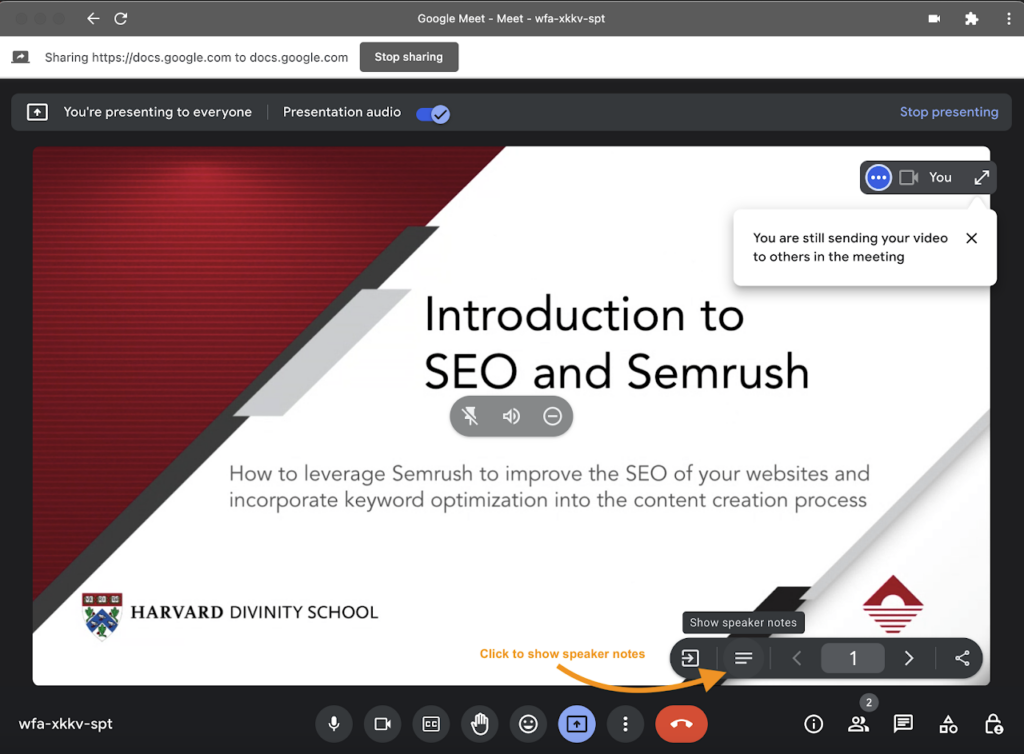
  • To view the speaker notes, click on the 3 horizontal lines icon to the left of the left arrow in the Presentation Controls.
  • Speaker notes will appear in the right column.
A/B TEST Laptop on table man work test

What is A/B Testing and How to Use It?

A beginner guide to A/B testing and achieving quick results.

What is A/B testing?

A/B testing, sometimes referred to as “split testing,” is a user experience research method that compares two versions of something to learn which performs better. When it comes to ever-evolving digital advertising, A/B testing is extremely important, as it helps us learn new strategies to improve our campaigns.

Benefits of A/B testing?

A/B testing can help you implement long-term strategies and solutions for your brand or your clients. A/B testing is highly customizable to fit everyone’s individual needs and goals, but here are some common benefits of A/B testing:

  1. Make data-backed decisions

A/B testing takes the guesswork out of your advertising and marketing campaigns, enabling you to make informed choices when it comes to optimizing your content.

  1. Reduce bounce rates

With A/B testing, you can try out different tactics of retaining your leads and audience on your website longer, increasing the likelihood of them interacting with your content.

  1. Quick results

In a fast-paced world of digital marketing, quick and reliable results are crucial for increasing campaign effectiveness. Even a relatively small A/B test can provide significant, actionable results that allow for low-risk modifications and improved campaign performance.

How do you start A/B testing? 

  1. Carve out a portion of the budget to test with (percentage allocation will depend on the overall client budget). The remaining budget should be prioritized for the highest-performing campaign.
  2. The A/B test campaigns should always run at the same time. The only variable that should be different is what’s being tested—everything else, such as flight, budget, and audience should be the same.
  3. The testing period should be set for about 2-3 weeks, no matter which of the two tests (or both) you decide to move forward with.
  4. The key performance indicator (KPI) of A/B testing for lead generation campaigns should be Leads/Cost-Per-Lead (CPL), and the KPI for brand or traffic campaigns should be website traffic or clicks.

Want to learn more about A/B testing for specific social media platforms? Read our blog on the importance of LinkedIn A/B testing or contact us to learn how our team can help your content stand out.

Businessman analyzing company's financial balance sheet working with digital augmented reality graphics. Businessman calculates financial data for long-term investment.

Inside 5 Horizons: A/B Testing on LinkedIn

Danielle Romano, Director of Performance and Analytics, shares her thoughts on the necessity of LinkedIn A/B testing.


A/B testing is an essential experiment for determining which form of content performs better on a platform and drives higher engagement and results. Here is what Danielle’s team has discovered through experimenting with LinkedIn A/B testing.

What can you A/B test on LinkedIn?

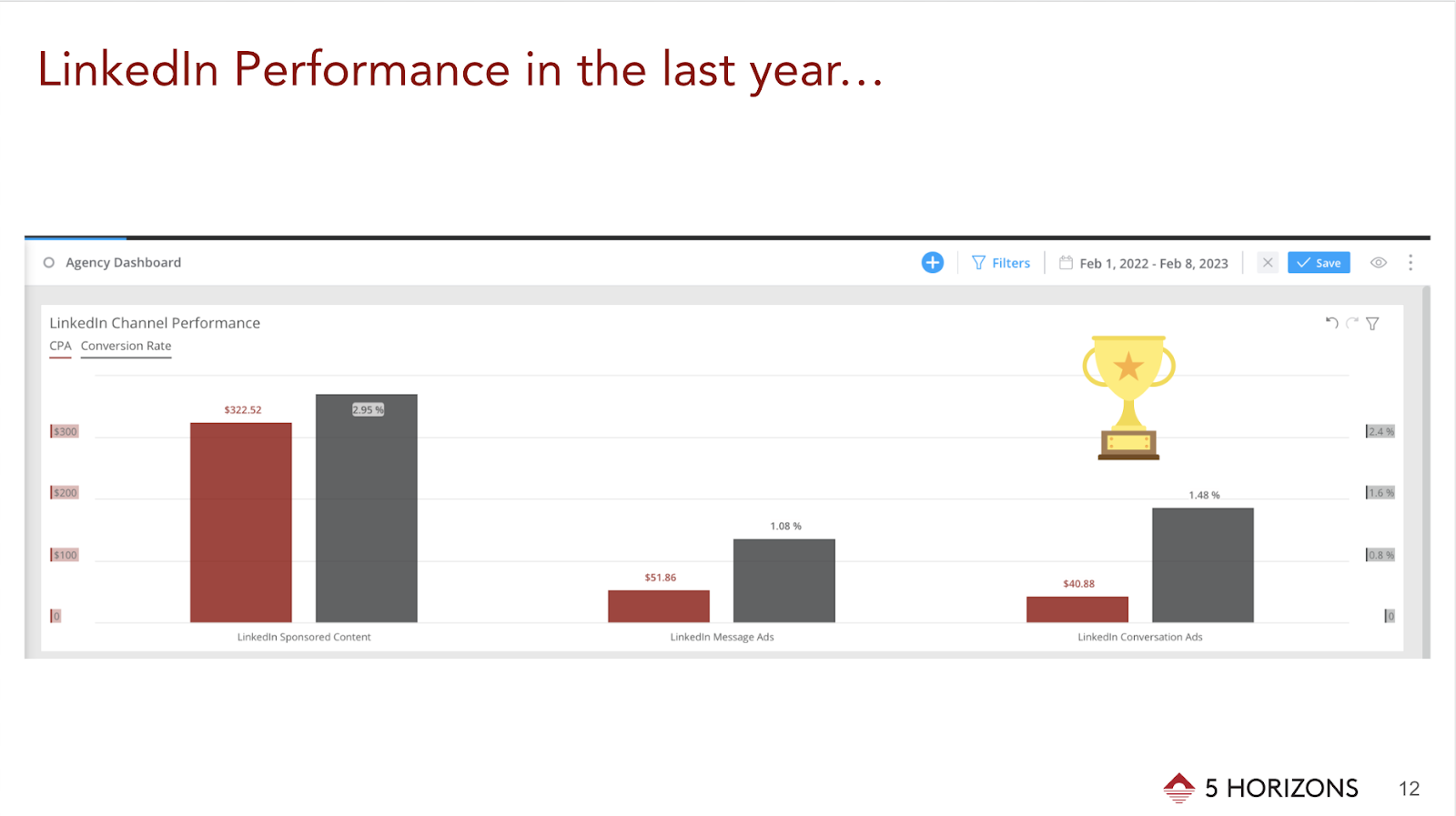
Through A/B testing, we learned that LinkedIn Conversation Ads performed best for our higher education clients and generated the most leads. We hypothesize that we saw such a significant increase in results because the Conversation Ad format provides just the right amount of context for people to act and request more information. 

Things to keep in mind when considering A/B testing for this platform:

Copy Length

Short and long copy speaks to how much information and details someone needs to take action, and experimenting with different text lengths can help establish best practices for the future.

Ad Formats 

LinkedIn offers a variety of ad formats to choose from, all of which can be put to A/B testing to find out which format is the most successful for specific objectives.

Text Ads

Text ads are a great format to use when the message is clear and concise—brand campaigns typically benefit from this LinkedIn ad type. When it comes to our practice, we don’t usually reach for this format because we run program-specific campaigns for our higher education clients. Through A/B testing, we learned that such campaigns perform better when additional copy and visuals are present.

Sponsored Content

This format works well for event ads or advertising programs at a brand level. We typically run in-app lead generation campaigns using this format with a program brochure or a “request more information” call to action as our incentives.

Conversation Ads

Conversation Ads tend to succeed when used for a program that may be unique or requires additional context. This strategy also works well for smaller clients because it goes directly to the users’ inboxes without having to fight for space in the feed.

Document Ads

Document Ads are new to Linkedin, but we anticipate this format to become a new way of advertising program brochures or any relevant learning materials that can be easily formatted as a .pdf file.

Images 

  • Images of people vs. images of objects: Sometimes a photo of a person in business attire works well for a client, other times a textbook with a client logo outperforms elsewhere. 
  • Branded imagery vs. non-branded imagery: Well-known brands typically generate better engagement rates when there is a logo associated with the image, whereas local or smaller brands can blend in with the feed through a more organic image, without any branding. 

These tips and resources can be used to start and better understand the importance of A/B testing for any brand or client. If you’re curious to learn more about LinkedIn, read our 2023 LinkedIn Updates and stay up-to-date on how to use the platform to its fullest potential.

The Inside 5 Horizons series includes stories and perspectives from our amazing team. Get a glimpse into our company culture each month by hearing the unique voices of our copywriters, strategists, project managers, and more.

Joking group of diverse young adult coworkers playing with sticky notes on their faces as a distraction during a meeting

Laugh at Work Week

April 1st through the 7th is Laugh at Work Week! LAWW is the annual opportunity to promote fun and laughter in the workplace. You’ve probably heard of the phrase “laughter is the best medicine”used to describe the feel-good endorphins released when we laugh. Endorphins can decrease your pain, improve your mood, and reduce your stress.

At 5 Horizons, we embrace humor and fun every day to keep stress low and morale high. Here are our top three tips for cultivating a workspace full of laughter:

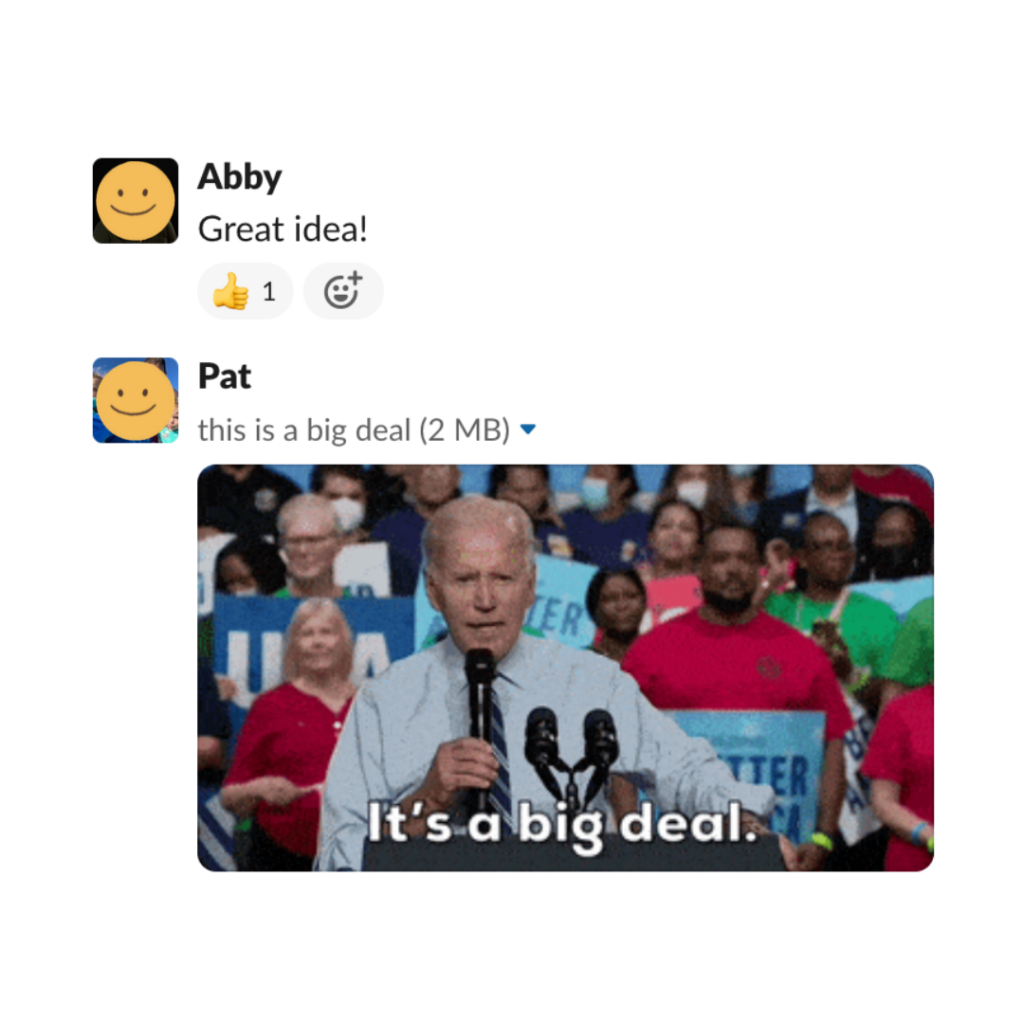
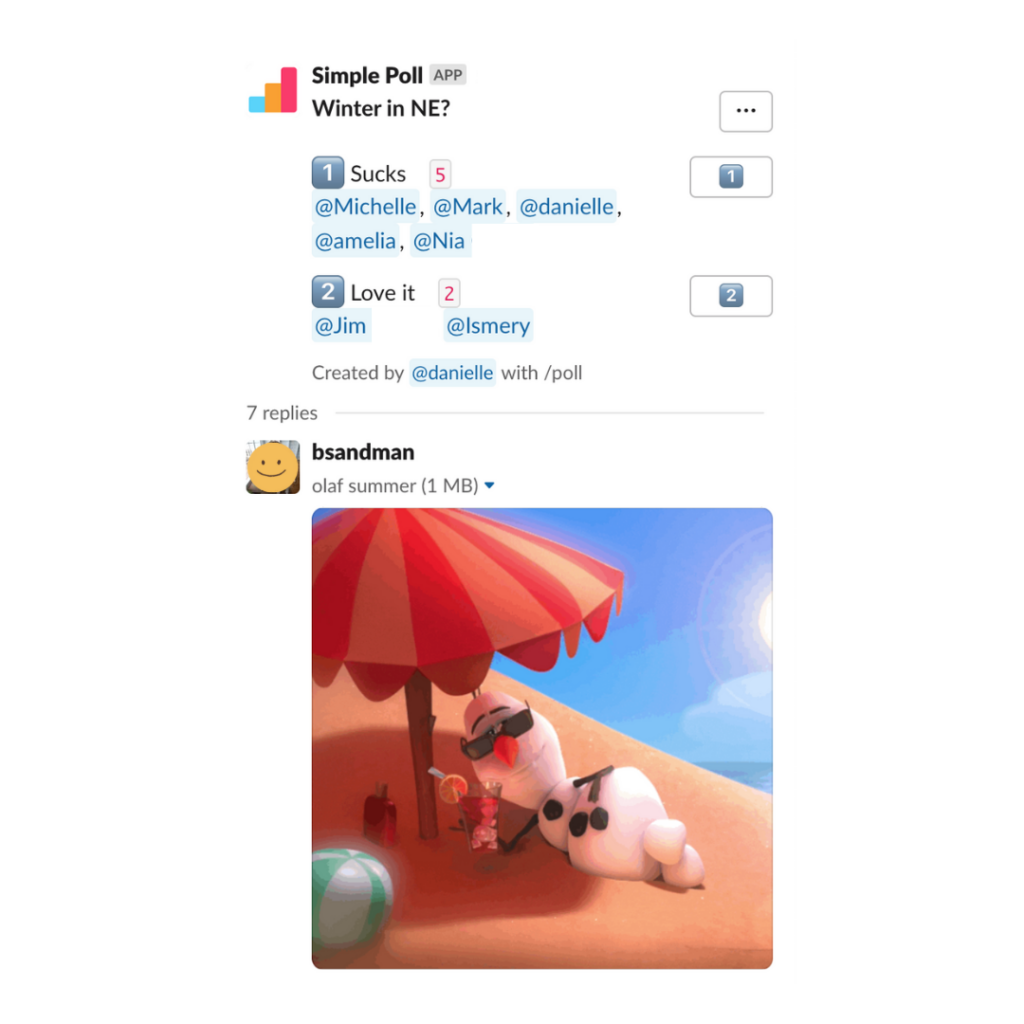
  1. Incorporate gifs, emojis, and jokes into your Slack or online company chats to add reactions and humor to your conversations
  2. Use virtual or in-person meetings to foster a lighthearted atmosphere with funny anecdotes or pop culture references
  3. When challenges arise, model the appropriate stress response for your employees by using lighthearted humor

Extend Laugh at Work Week by prioritizing humor in the workplace every week of the year. For more examples of how to foster a fun work environment, read our recent blog here.